
Selfie Speech Bubble Meme Generator
Create Your Selfie Speech Bubble Meme
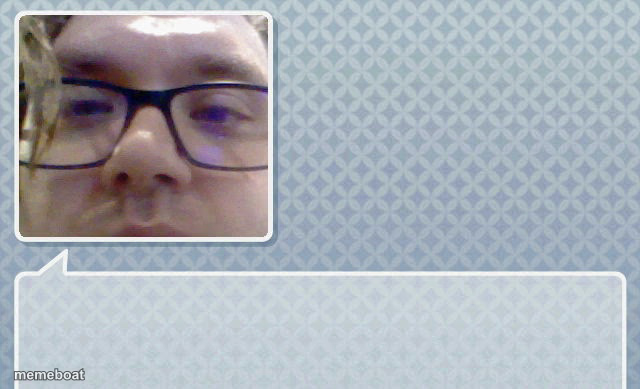
A cropped selfie of a guy in glasses tucked into a blank speech bubble template — drop in any awkward quote and caption it free.
Blank Selfie Speech Bubble meme template
Download the blank Selfie Speech Bubble template to caption it yourself, or add your text right here in the editor above and download the finished meme.
When to use the Selfie Speech Bubble meme
- Putting words in someone's mouth via a fake text bubble
- The 'thing my friend definitely did not say' format
- Screenshotting a reaction face and writing the quote yourself
Selfie Speech Bubble template facts
- Dimensions
- 640 × 389 px
- Format
- JPG
- Added
- 2025
About the Selfie Speech Bubble meme template
Someone's close-up selfie sits inside a rounded speech-bubble frame with a huge empty space below, just begging for text. The blank canvas practically dares you to write the most unhinged thing that guy never actually said.
Templates similar to Selfie Speech Bubble

Selfie Speech Bubble meme FAQ
How do I make a Selfie Speech Bubble meme?
Scroll up to the Selfie Speech Bubble template, add your own text boxes in the editor above and type your captions, adjust the font, size and color if you like, then click download. Your finished Selfie Speech Bubble meme is ready to share in seconds.
Can I use the Selfie Speech Bubble template for free?
Yes. The Selfie Speech Bubble template is completely free to use — no signup and no limits on how many memes you create or where you share them.
How do I download my Selfie Speech Bubble meme?
Click the download button under the editor once your Selfie Speech Bubble meme looks right. It saves straight to your device as a high-quality PNG or JPEG image.
How do I download the blank Selfie Speech Bubble template?
Use the "Download blank template" button in the blank Selfie Speech Bubble template section above to save the original, un-captioned image — handy if you'd rather caption it in another app or keep a copy.