
Scared Square Meme Generator
Create Your Scared Square Meme
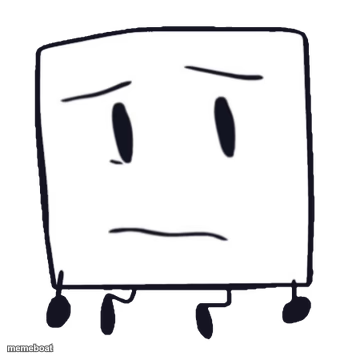
A hand-drawn square character with a worried, side-eye face — perfect for awkward or anxious moments. Caption it and download free.
Blank Scared Square meme template
Download the blank Scared Square template to caption it yourself, or add your text right here in the editor above and download the finished meme.
When to use the Scared Square meme
- Watching your group chat go silent after you sent something cringe
- Standing next to the thing you just broke, hoping no one notices
Scared Square template facts
- Dimensions
- 360 × 360 px
- Format
- PNG
- Text boxes
- 1
- Added
- 2025
About the Scared Square meme template
This little sketchy square has the face of someone who just remembered they left the stove on. Simple, hand-drawn, and dripping with low-key anxiety — the kind of expression you make when you're pretending everything's fine.
Great for those quietly stressful moments: awkward silences, bad decisions you're standing by, or just staring blankly at a problem you don't want to deal with.
Popular Scared Square caption ideas
Me pretending I didn't just hit reply-all
When they ask who ate the last slice
That face when the WiFi cuts out during the interview
Templates similar to Scared Square


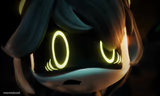
Scared Square meme FAQ
How do I make a Scared Square meme?
Scroll up to the Scared Square template, type your caption into the text box in the editor above, adjust the font, size and color if you like, then click download. Your finished Scared Square meme is ready to share in seconds.
Can I use the Scared Square template for free?
Yes. The Scared Square template is completely free to use — no signup and no limits on how many memes you create or where you share them.
How do I download my Scared Square meme?
Click the download button under the editor once your Scared Square meme looks right. It saves straight to your device as a high-quality PNG or JPEG image.
How do I download the blank Scared Square template?
Use the "Download blank template" button in the blank Scared Square template section above to save the original, un-captioned image — handy if you'd rather caption it in another app or keep a copy.