
Scared Caine Meme Generator
Create Your Scared Caine Meme
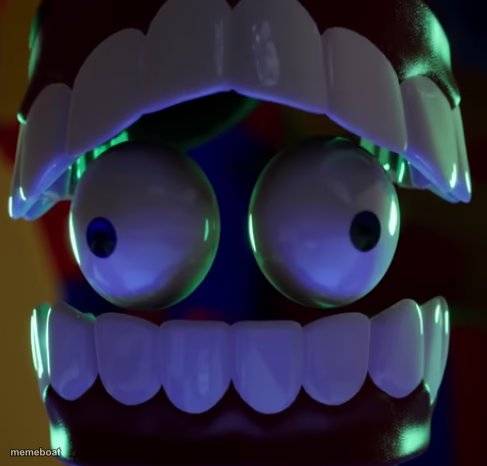
Extreme closeup of a wide-eyed, teeth-clenched 3D animated face frozen in shock. Perfect for reacting to bad news. Caption it free and download.
Blank Scared Caine meme template
Download the blank Scared Caine template to caption it yourself, or add your text right here in the editor above and download the finished meme.
When to use the Scared Caine meme
- Reacting to an unexpected notification
- Seeing the bill after ordering 'just an appetizer'
- The moment before you hit send on a risky text
Scared Caine template facts
- Dimensions
- 487 × 466 px
- Format
- PNG
- Text boxes
- 2
- Added
- 2025
About the Scared Caine meme template
This one is all eyeballs and enamel. A claymation-style face crammed right up to the lens, jaw locked open, giant glossy eyes bugging out like it just saw the group chat notifications pile up.
It is the universal face of "wait, what," "oh no," and "I did not think this through." Drop in your own top and bottom line and let those teeth do the talking.
Popular Scared Caine caption ideas
ME OPENING MY BANK APP · AFTER PAYDAY WEEKEND
WHEN THE WIFI DROPS · DURING THE BOSS FIGHT
THAT FACE YOU MAKE · WHEN AUTOCORRECT BETRAYS YOU
Templates similar to Scared Caine



Scared Caine meme FAQ
How do I make a Scared Caine meme?
Scroll up to the Scared Caine template, type your caption into the 2 text boxes in the editor above, adjust the font, size and color if you like, then click download. Your finished Scared Caine meme is ready to share in seconds.
Can I use the Scared Caine template for free?
Yes. The Scared Caine template is completely free to use — no signup and no limits on how many memes you create or where you share them.
How do I download my Scared Caine meme?
Click the download button under the editor once your Scared Caine meme looks right. It saves straight to your device as a high-quality PNG or JPEG image.
How do I download the blank Scared Caine template?
Use the "Download blank template" button in the blank Scared Caine template section above to save the original, un-captioned image — handy if you'd rather caption it in another app or keep a copy.