
TF2 Engineer Say What Now Meme Generator
Create Your TF2 Engineer Say What Now Meme
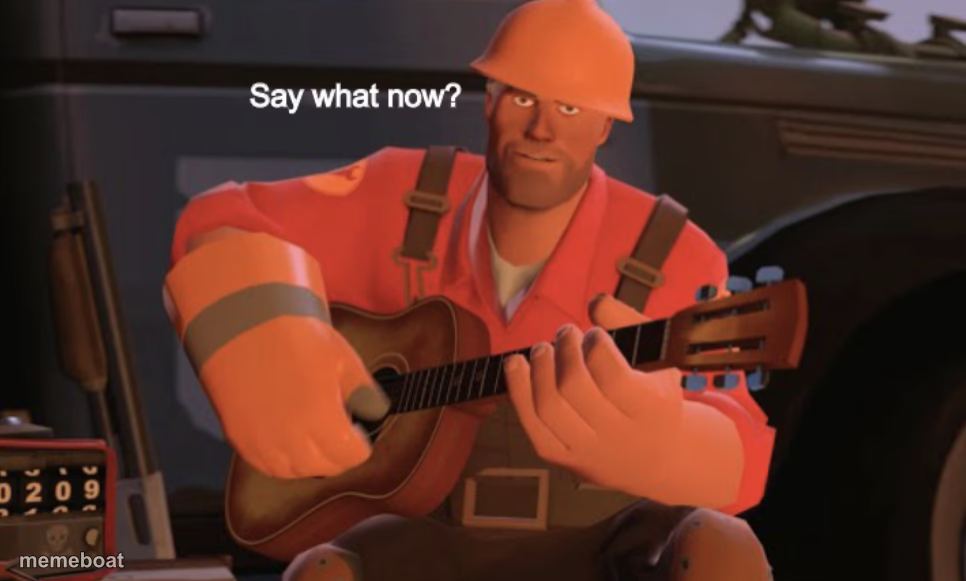
The TF2 Engineer with a guitar, raising an eyebrow and asking 'say what now?' Great for disbelief and calling out nonsense. Free to caption and share.
Blank TF2 Engineer Say What Now meme template
Download the blank TF2 Engineer Say What Now template to caption it yourself, or add your text right here in the editor above and download the finished meme.
When to use the TF2 Engineer Say What Now meme
- When a coworker gives an excuse that makes absolutely no sense
- Hearing a wild conspiracy theory from a friend at a party
- Someone claims they 'totally meant to do that' after an obvious mistake
- Reacting to a price tag that seems criminally overpriced
TF2 Engineer Say What Now template facts
- Featuring
- Engineer (Team Fortress 2)
- Dimensions
- 966 × 581 px
- Format
- JPG
- Added
- 2025
About the TF2 Engineer Say What Now meme template
The Engineer from Team Fortress 2, guitar in hand, giving that classic skeptical eyebrow raise with 'Say what now?' already on screen. It's the perfect blend of country charm and 'I heard you, but I need you to repeat that because it makes no sense.'
Use it for calling out a wild claim, reacting to an absurd excuse, or any moment someone says something so unbelievable you need it repeated slower.
Templates similar to TF2 Engineer Say What Now



TF2 Engineer Say What Now meme FAQ
How do I make a TF2 Engineer Say What Now meme?
Scroll up to the TF2 Engineer Say What Now template, add your own text boxes in the editor above and type your captions, adjust the font, size and color if you like, then click download. Your finished TF2 Engineer Say What Now meme is ready to share in seconds.
Can I use the TF2 Engineer Say What Now template for free?
Yes. The TF2 Engineer Say What Now template is completely free to use — no signup and no limits on how many memes you create or where you share them.
How do I download my TF2 Engineer Say What Now meme?
Click the download button under the editor once your TF2 Engineer Say What Now meme looks right. It saves straight to your device as a high-quality PNG or JPEG image.
How do I download the blank TF2 Engineer Say What Now template?
Use the "Download blank template" button in the blank TF2 Engineer Say What Now template section above to save the original, un-captioned image — handy if you'd rather caption it in another app or keep a copy.