
Treebeard Meme Generator
Create Your Treebeard Meme
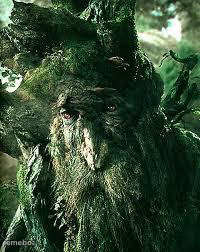
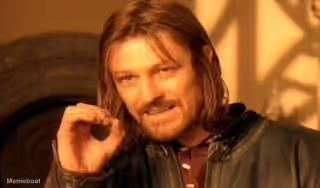
Treebeard from Lord of the Rings, looking ancient and weary. Perfect for jokes about taking forever to decide anything. Free to caption and download.
Blank Treebeard meme template
Download the blank Treebeard template to caption it yourself, or add your text right here in the editor above and download the finished meme.
When to use the Treebeard meme
- When someone takes forever to text back
- Explaining a story with way too much unnecessary detail
- That one professor who never gets to the point
- Waiting for a decision that should've taken 5 minutes
Treebeard template facts
- Featuring
- Treebeard (The Lord of the Rings)
- Dimensions
- 200 × 252 px
- Format
- JPG
- Text boxes
- 1
- Added
- 2025
About the Treebeard meme template
Treebeard, the slowest-talking Ent in Middle-earth, looking every bit as ancient and moss-covered as his reputation suggests. This is a face that has seen centuries pass and still hasn't finished a sentence yet.
Use this for anyone who takes forever to reply, rambles before getting to the point, or moves at the pace of continental drift. It's patience personified — and mildly unhinged about it.
Popular Treebeard caption ideas
Me deciding what to eat for 45 minutes
When you ask 'quick question' and it's not quick
Still loading since 2019

Treebeard meme FAQ
How do I make a Treebeard meme?
Scroll up to the Treebeard template, type your caption into the text box in the editor above, adjust the font, size and color if you like, then click download. Your finished Treebeard meme is ready to share in seconds.
Can I use the Treebeard template for free?
Yes. The Treebeard template is completely free to use — no signup and no limits on how many memes you create or where you share them.
How do I download my Treebeard meme?
Click the download button under the editor once your Treebeard meme looks right. It saves straight to your device as a high-quality PNG or JPEG image.
How do I download the blank Treebeard template?
Use the "Download blank template" button in the blank Treebeard template section above to save the original, un-captioned image — handy if you'd rather caption it in another app or keep a copy.