
Sad Tom Meme Generator
Create Your Sad Tom Meme
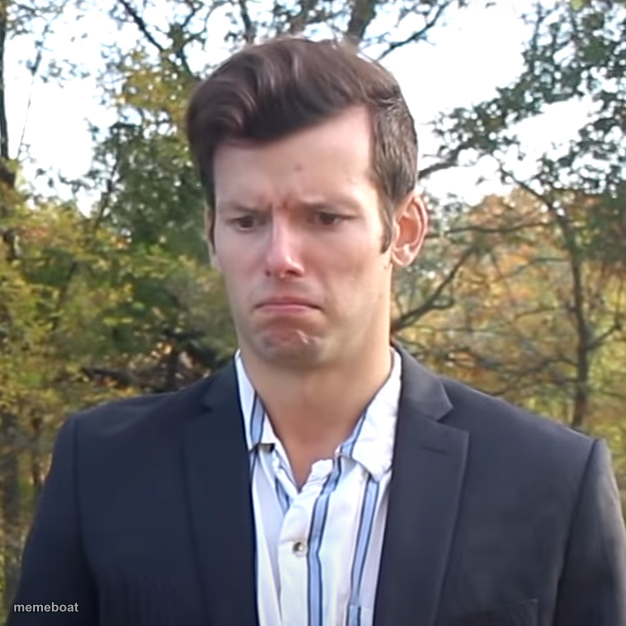
A guy in a blazer outside looking genuinely let down, like he just heard the worst possible news. Great reaction template. Caption it free.
Blank Sad Tom meme template
Download the blank Sad Tom template to caption it yourself, or add your text right here in the editor above and download the finished meme.
When to use the Sad Tom meme
- Finding out the restaurant closed early on your one night out
- Hearing your flight got delayed another 4 hours
- Watching your team blow a 20-point lead
- Opening the fridge and remembering you ate the leftovers already
Sad Tom template facts
- Dimensions
- 626 × 626 px
- Format
- PNG
- Text boxes
- 2
- Added
- 2025
About the Sad Tom meme template
This is the face of someone who just found out the plan fell through, mouth turned down, eyebrows furrowed, standing in the woods like the disappointment physically stopped him in his tracks.
It's a perfect reaction shot for any letdown: the restaurant's closed, the flight got cancelled, your team blew a lead. Understated, no yelling, just pure quiet devastation.
Popular Sad Tom caption ideas
WHEN THE PIZZA PLACE CLOSES · 5 MINUTES BEFORE YOU GET THERE
ME REALIZING I ALREADY ATE · THE LEFTOVERS I WAS LOOKING FORWARD TO
WHEN THE GAME GOES TO OVERTIME · AND YOU HAVE WORK TOMORROW
Templates similar to Sad Tom

Sad Tom meme FAQ
How do I make a Sad Tom meme?
Scroll up to the Sad Tom template, type your caption into the 2 text boxes in the editor above, adjust the font, size and color if you like, then click download. Your finished Sad Tom meme is ready to share in seconds.
Can I use the Sad Tom template for free?
Yes. The Sad Tom template is completely free to use — no signup and no limits on how many memes you create or where you share them.
How do I download my Sad Tom meme?
Click the download button under the editor once your Sad Tom meme looks right. It saves straight to your device as a high-quality PNG or JPEG image.
How do I download the blank Sad Tom template?
Use the "Download blank template" button in the blank Sad Tom template section above to save the original, un-captioned image — handy if you'd rather caption it in another app or keep a copy.