
sad potato Meme Generator
Create Your sad potato Meme
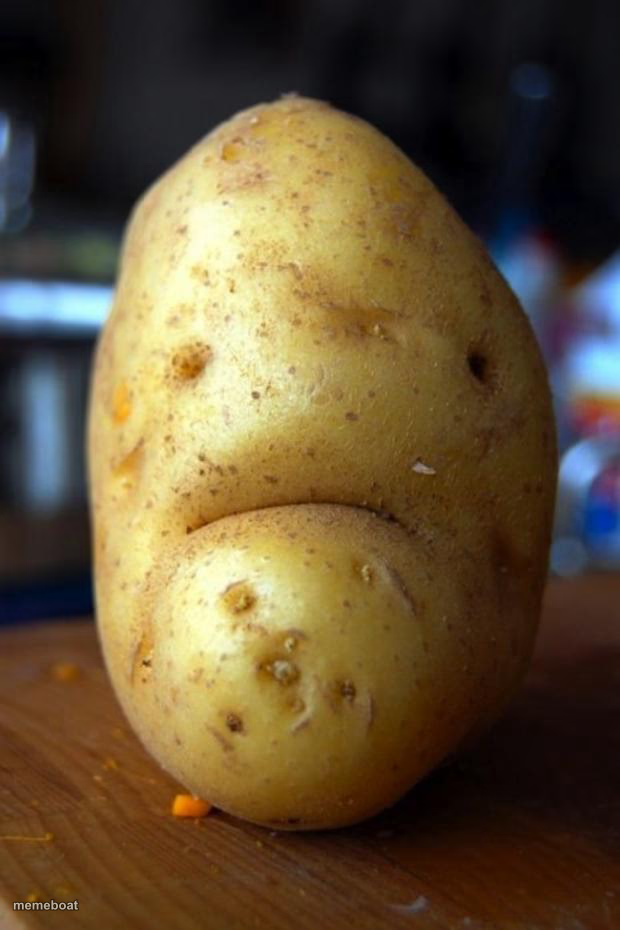
A potato with a naturally frowning face, looking utterly disappointed in life. Great for low-energy mood posts. Caption it free and download instantly.
Blank sad potato meme template
Download the blank sad potato template to caption it yourself, or add your text right here in the editor above and download the finished meme.
When to use the sad potato meme
- Opening the fridge and finding nothing good to eat
- Getting rained on with no umbrella
- Checking your bank account before payday
sad potato template facts
- Dimensions
- 620 × 930 px
- Format
- JPG
- Text boxes
- 1
- Added
- 2025
About the sad potato meme template
Nature accidentally carved a tiny frown into this potato and now it's the perfect stand-in for every time you're just done with the week. No drama, no tears, just a root vegetable that's given up.
Use it for Mondays, diet failures, disappointing plans, or anything where the vibe is quiet resignation rather than full meltdown. It's relatable precisely because it says nothing at all.
Popular sad potato caption ideas
Me when the waiter says they're out of what I wanted to order
My face when I remember I have to adult tomorrow
When the gym playlist ends and you have three more sets to go
Templates similar to sad potato
sad potato meme FAQ
How do I make a sad potato meme?
Scroll up to the sad potato template, type your caption into the text box in the editor above, adjust the font, size and color if you like, then click download. Your finished sad potato meme is ready to share in seconds.
Can I use the sad potato template for free?
Yes. The sad potato template is completely free to use — no signup and no limits on how many memes you create or where you share them.
How do I download my sad potato meme?
Click the download button under the editor once your sad potato meme looks right. It saves straight to your device as a high-quality PNG or JPEG image.
How do I download the blank sad potato template?
Use the "Download blank template" button in the blank sad potato template section above to save the original, un-captioned image — handy if you'd rather caption it in another app or keep a copy.