
Sad pichu Meme Generator
Create Your Sad pichu Meme
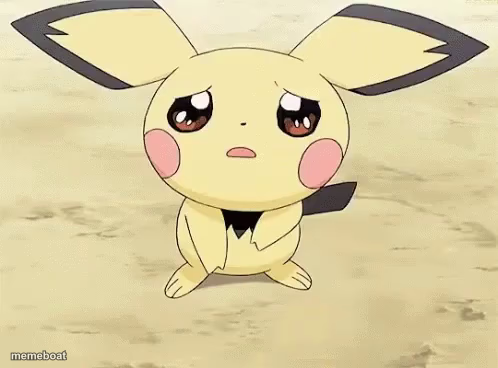
Sad Pichu with watery eyes and a wobbly frown, perfect for disappointment or heartbreak captions. Caption and download this template free.
Blank Sad pichu meme template
Download the blank Sad pichu template to caption it yourself, or add your text right here in the editor above and download the finished meme.
When to use the Sad pichu meme
- When your order gets cancelled right before it ships
- Reacting to a friend leaving you on read for three days
- Realizing the good snacks are all gone
Sad pichu template facts
- Featuring
- Pichu (Pokémon)
- Dimensions
- 498 × 368 px
- Format
- PNG
- Text boxes
- 1
- Added
- 2025
About the Sad pichu meme template
Look at this little guy. Pichu is standing there in the dirt with the biggest, wettest puppy-dog eyes you've ever seen, tail drooping, clearly one bad day away from crying electricity everywhere. It's the anime sad face turned up to eleven.
Use it for anything that hits you right in the feels: getting left on read, watching your favorite show get cancelled, or just realizing it's Monday again. Big "I'm not crying, you're crying" energy.
Popular Sad pichu caption ideas
me realizing it's monday tomorrow
when they say 'we need to talk'
watching my wifi buffer during the finale
Templates similar to Sad pichu






Sad pichu meme FAQ
How do I make a Sad pichu meme?
Scroll up to the Sad pichu template, type your caption into the text box in the editor above, adjust the font, size and color if you like, then click download. Your finished Sad pichu meme is ready to share in seconds.
Can I use the Sad pichu template for free?
Yes. The Sad pichu template is completely free to use — no signup and no limits on how many memes you create or where you share them.
How do I download my Sad pichu meme?
Click the download button under the editor once your Sad pichu meme looks right. It saves straight to your device as a high-quality PNG or JPEG image.
How do I download the blank Sad pichu template?
Use the "Download blank template" button in the blank Sad pichu template section above to save the original, un-captioned image — handy if you'd rather caption it in another app or keep a copy.