
Sad Bugs Bunny Meme Generator
Create Your Sad Bugs Bunny Meme
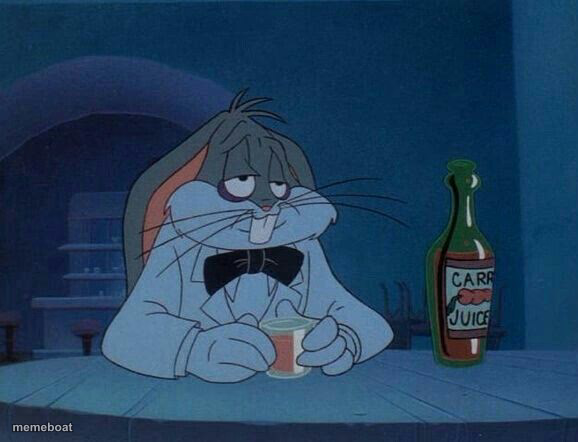
Bugs Bunny slumped at a table with a drink, looking utterly defeated. The ultimate 'rock bottom but make it cartoon' reaction. Free to caption and download.
Blank Sad Bugs Bunny meme template
Download the blank Sad Bugs Bunny template to caption it yourself, or add your text right here in the editor above and download the finished meme.
When to use the Sad Bugs Bunny meme
- Realizing you replied-all to the whole company by accident
- The read receipt shows they saw your message an hour ago
- When the diet starts tomorrow, again, for the 50th time
Sad Bugs Bunny template facts
- Featuring
- Bugs Bunny (Looney Tunes / Tiny Toons carrot juice ad)
- Dimensions
- 578 × 442 px
- Format
- JPG
- Added
- 2025
About the Sad Bugs Bunny meme template
Bow tie crooked, eyes half-closed, sipping something that is definitely not helping — this rabbit has seen things. It's the cartoon version of staring into your drink at 2am wondering where it all went wrong.
Use it for any moment of quiet, dignified defeat: getting dumped, bombing an interview, or just Mondays in general. Understated despair, maximum relatability.
Popular Sad Bugs Bunny caption ideas
MY MOVIE · GOT CANCELLED
Templates similar to Sad Bugs Bunny


Sad Bugs Bunny meme FAQ
How do I make a Sad Bugs Bunny meme?
Scroll up to the Sad Bugs Bunny template, add your own text boxes in the editor above and type your captions, adjust the font, size and color if you like, then click download. Your finished Sad Bugs Bunny meme is ready to share in seconds.
Can I use the Sad Bugs Bunny template for free?
Yes. The Sad Bugs Bunny template is completely free to use — no signup and no limits on how many memes you create or where you share them.
How do I download my Sad Bugs Bunny meme?
Click the download button under the editor once your Sad Bugs Bunny meme looks right. It saves straight to your device as a high-quality PNG or JPEG image.
How do I download the blank Sad Bugs Bunny template?
Use the "Download blank template" button in the blank Sad Bugs Bunny template section above to save the original, un-captioned image — handy if you'd rather caption it in another app or keep a copy.