
Rotgut Meme Generator
Create Your Rotgut Meme
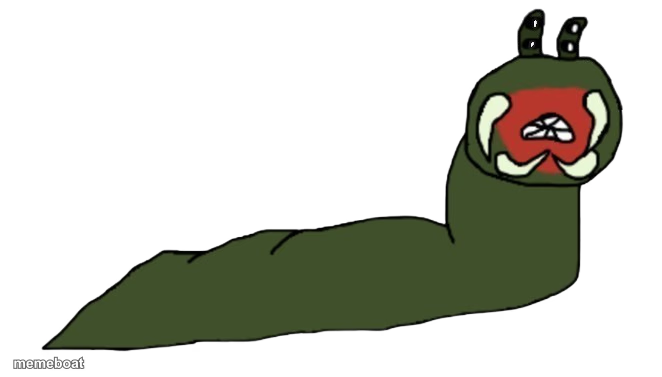
A crudely drawn green worm with eyestalks screaming with its mouth wide open. Add captions to it and download free.
Blank Rotgut meme template
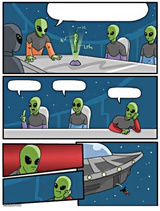
Download the blank Rotgut template to caption it yourself, or add your text right here in the editor above and download the finished meme.
When to use the Rotgut meme
- Reacting to a surprise Zoom call five minutes before you're ready
- Seeing the group chat notification count hit triple digits
- Realizing the assignment was due yesterday, not tomorrow
Rotgut template facts
- Dimensions
- 662 × 377 px
- Format
- PNG
- Text boxes
- 2
- Added
- 2025
About the Rotgut meme template
Some things don't need a Pixar budget to hit hard, and this screaming green worm doodle is proof. Two little eyestalks, a wide-open red mouth, and pure unfiltered panic scribbled in MS-Paint energy — it's the visual equivalent of a internal scream nobody asked for.
Use it whenever words alone can't capture the exact pitch of your distress. Monday morning, group project, inbox at 999 unread — whatever it is, this worm already feels it more than you do.
Popular Rotgut caption ideas
ME OPENING MY LAPTOP · AND SEEING 47 UNREAD EMAILS
WHEN THE WIFI DROPS · DURING THE BOSS FIGHT
MY INNER MONOLOGUE · EVERY SINGLE MONDAY
Rotgut meme FAQ
How do I make a Rotgut meme?
Scroll up to the Rotgut template, type your caption into the 2 text boxes in the editor above, adjust the font, size and color if you like, then click download. Your finished Rotgut meme is ready to share in seconds.
Can I use the Rotgut template for free?
Yes. The Rotgut template is completely free to use — no signup and no limits on how many memes you create or where you share them.
How do I download my Rotgut meme?
Click the download button under the editor once your Rotgut meme looks right. It saves straight to your device as a high-quality PNG or JPEG image.
How do I download the blank Rotgut template?
Use the "Download blank template" button in the blank Rotgut template section above to save the original, un-captioned image — handy if you'd rather caption it in another app or keep a copy.