
Roblox Coming For You Kid Meme Generator
Create Your Roblox Coming For You Kid Meme
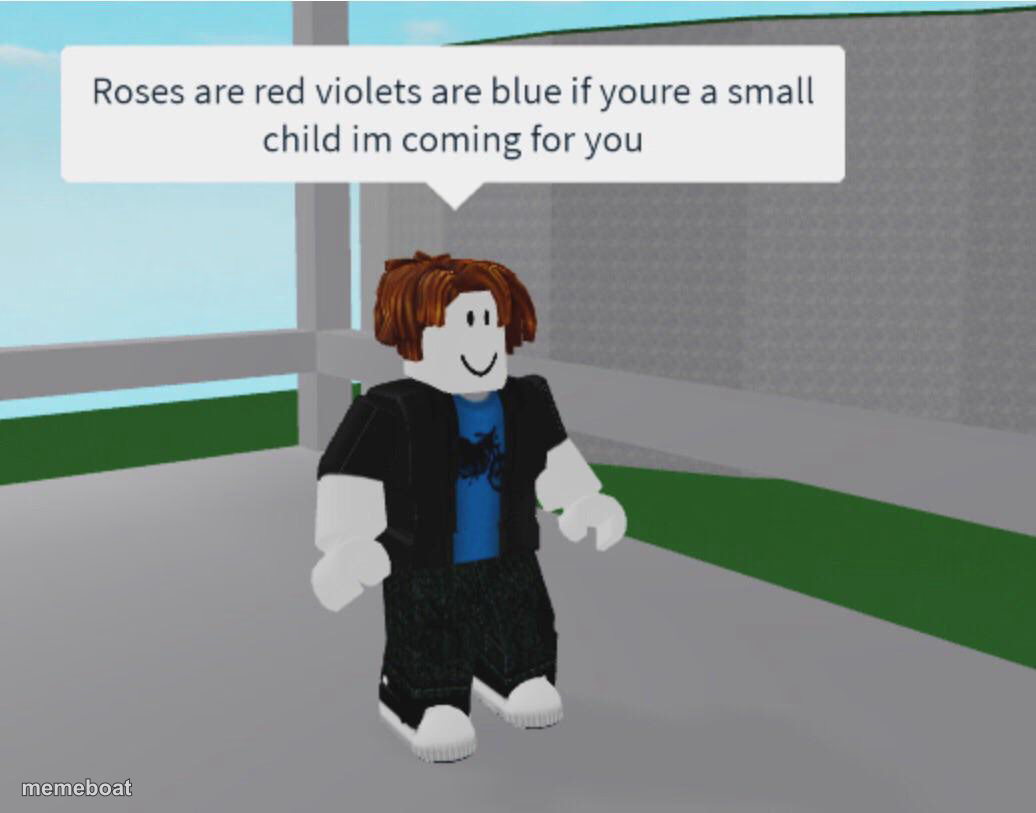
A Roblox character stands smiling under a menacing 'roses are red' rhyme about coming for small children — the internet's favorite fake-innocent creepy meme. Caption it free.
Blank Roblox Coming For You Kid meme template
Download the blank Roblox Coming For You Kid template to caption it yourself, or add your text right here in the editor above and download the finished meme.
When to use the Roblox Coming For You Kid meme
- Fake-innocent threat aimed at younger siblings
- Ominous warning disguised as a nursery rhyme
- Any 'I'm coming for you' joke with a smiling face
- Mocking creepy internet stranger-danger memes
Roblox Coming For You Kid template facts
- Dimensions
- 1036 × 813 px
- Format
- JPG
- Added
- 2025
About the Roblox Coming For You Kid meme template
A perfectly cheerful Roblox avatar stands there smiling like nothing's wrong, while the speech bubble above delivers an unsettling little rhyme aimed at small children. That contrast between the goofy blocky character and the ominous text is the entire joke.
Templates similar to Roblox Coming For You Kid
Roblox Coming For You Kid meme FAQ
How do I make a Roblox Coming For You Kid meme?
Scroll up to the Roblox Coming For You Kid template, add your own text boxes in the editor above and type your captions, adjust the font, size and color if you like, then click download. Your finished Roblox Coming For You Kid meme is ready to share in seconds.
Can I use the Roblox Coming For You Kid template for free?
Yes. The Roblox Coming For You Kid template is completely free to use — no signup and no limits on how many memes you create or where you share them.
How do I download my Roblox Coming For You Kid meme?
Click the download button under the editor once your Roblox Coming For You Kid meme looks right. It saves straight to your device as a high-quality PNG or JPEG image.
How do I download the blank Roblox Coming For You Kid template?
Use the "Download blank template" button in the blank Roblox Coming For You Kid template section above to save the original, un-captioned image — handy if you'd rather caption it in another app or keep a copy.