
rocky toad Meme Generator
Create Your rocky toad Meme
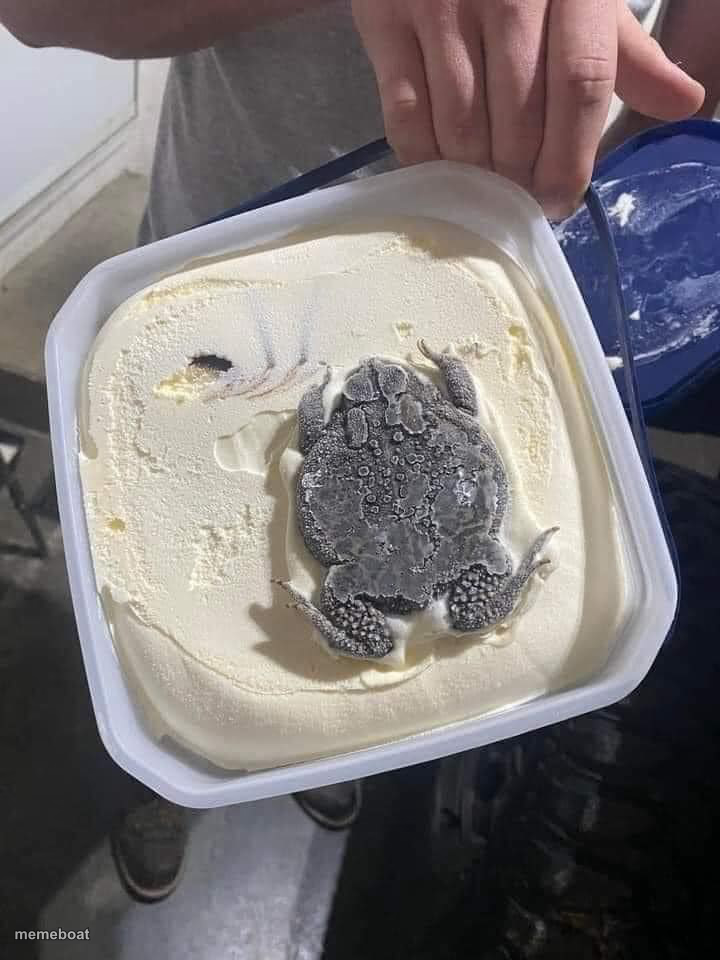
A weird lump shaped like a turtle sitting in a tub of ice cream — perfect for jokes about finding something you didn't order. Caption it free.
Blank rocky toad meme template
Download the blank rocky toad template to caption it yourself, or add your text right here in the editor above and download the finished meme.
When to use the rocky toad meme
- Opening a food container and finding something bizarre inside
- A surprise nobody wanted mixed into something normal
- Reacting to an unexpected 'bonus' in your order
- Discovering a weird easter egg in everyday life
rocky toad template facts
- Dimensions
- 720 × 960 px
- Format
- JPG
- Text boxes
- 2
- Added
- 2025
About the rocky toad meme template
Someone opened their ice cream and found what looks unmistakably like a stone turtle sitting in the middle of it. Nobody asked for this. It's the kind of cursed, deadpan photo that doesn't need context to be funny — it just needs a caption.
Great for 'when you open the fridge and find,' surprise reveals, or any joke about getting something extra (and unwelcome) that you didn't sign up for.
Popular rocky toad caption ideas
me: orders vanilla ice cream · also me: gets a whole turtle
Templates similar to rocky toad



rocky toad meme FAQ
How do I make a rocky toad meme?
Scroll up to the rocky toad template, type your caption into the 2 text boxes in the editor above, adjust the font, size and color if you like, then click download. Your finished rocky toad meme is ready to share in seconds.
Can I use the rocky toad template for free?
Yes. The rocky toad template is completely free to use — no signup and no limits on how many memes you create or where you share them.
How do I download my rocky toad meme?
Click the download button under the editor once your rocky toad meme looks right. It saves straight to your device as a high-quality PNG or JPEG image.
How do I download the blank rocky toad template?
Use the "Download blank template" button in the blank rocky toad template section above to save the original, un-captioned image — handy if you'd rather caption it in another app or keep a copy.