
reCAPTCHA Meme Generator
Create Your reCAPTCHA Meme
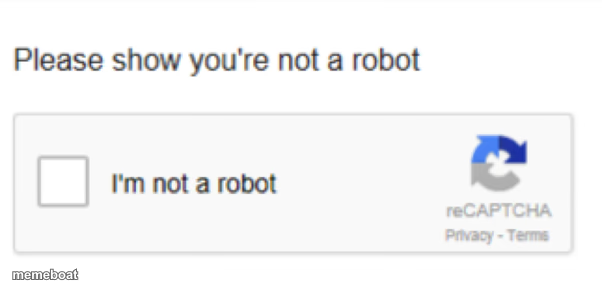
The classic reCAPTCHA 'I'm not a robot' checkbox — the internet's favorite gatekeeper. Great for jokes about proving you're human. Caption it free.
Blank reCAPTCHA meme template
Download the blank reCAPTCHA template to caption it yourself, or add your text right here in the editor above and download the finished meme.
When to use the reCAPTCHA meme
- Proving you're a functional adult before 10am
- Convincing your boss you didn't just wake up for this meeting
- Any time you have to click a box to confirm something that's clearly a lie
reCAPTCHA template facts
- Dimensions
- 602 × 287 px
- Format
- PNG
- Text boxes
- 1
- Added
- 2025
About the reCAPTCHA meme template
Everyone's seen this box a thousand times and clicked it while quietly panicking that the system knows something you don't. It's the internet's tiny trust exercise, and it's ripe for jokes about faking normalcy.
Use it for anything requiring you to prove you're fine, human, or not up to something, when you very much are. Swap the top line for whatever absurd claim you're being forced to make, and let the checkbox do the deadpan work.
Popular reCAPTCHA caption ideas
Please confirm you did not just eat cereal for dinner
Prove you actually read the group chat
Confirm you are not currently procrastinating
reCAPTCHA meme FAQ
How do I make a reCAPTCHA meme?
Scroll up to the reCAPTCHA template, type your caption into the text box in the editor above, adjust the font, size and color if you like, then click download. Your finished reCAPTCHA meme is ready to share in seconds.
Can I use the reCAPTCHA template for free?
Yes. The reCAPTCHA template is completely free to use — no signup and no limits on how many memes you create or where you share them.
How do I download my reCAPTCHA meme?
Click the download button under the editor once your reCAPTCHA meme looks right. It saves straight to your device as a high-quality PNG or JPEG image.
How do I download the blank reCAPTCHA template?
Use the "Download blank template" button in the blank reCAPTCHA template section above to save the original, un-captioned image — handy if you'd rather caption it in another app or keep a copy.