
Terrified Stewie Meme Generator
Create Your Terrified Stewie Meme
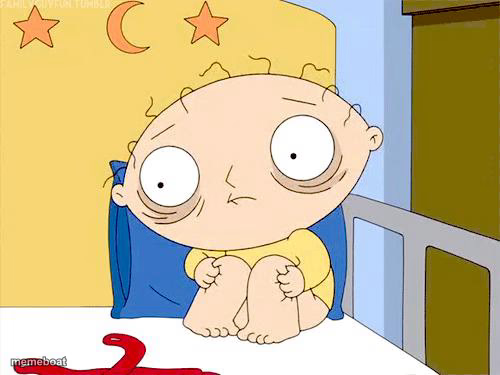
Stewie Griffin huddled on his bed wide-eyed and terrified, knees pulled up. Perfect for pure panic and dread moments. Caption and download free.
Blank Terrified Stewie meme template
Download the blank Terrified Stewie template to caption it yourself, or add your text right here in the editor above and download the finished meme.
When to use the Terrified Stewie meme
- Hearing footsteps after you thought you were alone
- Waiting for exam results you know are bad
- The moment before a deadline you completely forgot about
Terrified Stewie template facts
- Featuring
- Stewie Griffin (Family Guy)
- Dimensions
- 500 × 375 px
- Format
- JPG
- Text boxes
- 1
- Added
- 2025
About the Terrified Stewie meme template
Stewie's cornered himself on his bed, eyes bugging out, arms wrapped around his knees like something's about to get him. It's the universal pose for 'I have made a terrible mistake' energy — full-body dread with nowhere to run.
Popular Terrified Stewie caption ideas
Me after hitting 'reply all' by accident
When you hear your name from the other room
That feeling when the WiFi cuts during a boss fight
Templates similar to Terrified Stewie


Terrified Stewie meme FAQ
How do I make a Terrified Stewie meme?
Scroll up to the Terrified Stewie template, type your caption into the text box in the editor above, adjust the font, size and color if you like, then click download. Your finished Terrified Stewie meme is ready to share in seconds.
Can I use the Terrified Stewie template for free?
Yes. The Terrified Stewie template is completely free to use — no signup and no limits on how many memes you create or where you share them.
How do I download my Terrified Stewie meme?
Click the download button under the editor once your Terrified Stewie meme looks right. It saves straight to your device as a high-quality PNG or JPEG image.
How do I download the blank Terrified Stewie template?
Use the "Download blank template" button in the blank Terrified Stewie template section above to save the original, un-captioned image — handy if you'd rather caption it in another app or keep a copy.