
Professional Idiot Meme Generator
Create Your Professional Idiot Meme
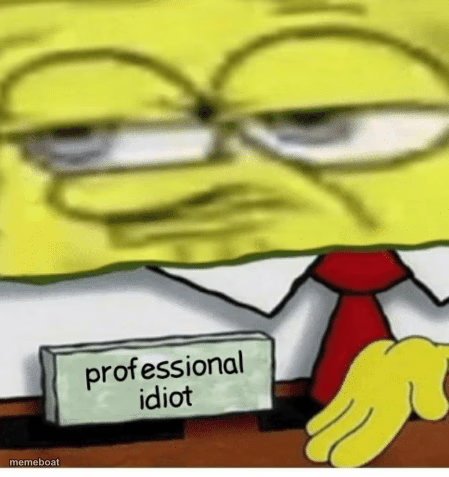
Blurry close-up SpongeBob face over a desk sign reading 'professional idiot' — the ultimate self-deprecating job title meme. Free to caption and download.
Blank Professional Idiot meme template
Download the blank Professional Idiot template to caption it yourself, or add your text right here in the editor above and download the finished meme.
When to use the Professional Idiot meme
- Introducing yourself at a new job with brutal honesty
- Describing your actual job title versus what's on your business card
- Admitting you have no idea what you're doing but you're doing it anyway
- That LinkedIn headline you wish you could actually post
Professional Idiot template facts
- Featuring
- SpongeBob SquarePants
- Dimensions
- 449 × 477 px
- Format
- PNG
- Added
- 2025
About the Professional Idiot meme template
Half zoomed-in, tired SpongeBob face, half desk nameplate that reads 'professional idiot' — it's basically a job title for anyone who's winging it at work and somehow still getting paid. The blur just adds to the exhausted, end-of-shift vibe.
Templates similar to Professional Idiot

Professional Idiot meme FAQ
How do I make a Professional Idiot meme?
Scroll up to the Professional Idiot template, add your own text boxes in the editor above and type your captions, adjust the font, size and color if you like, then click download. Your finished Professional Idiot meme is ready to share in seconds.
Can I use the Professional Idiot template for free?
Yes. The Professional Idiot template is completely free to use — no signup and no limits on how many memes you create or where you share them.
How do I download my Professional Idiot meme?
Click the download button under the editor once your Professional Idiot meme looks right. It saves straight to your device as a high-quality PNG or JPEG image.
How do I download the blank Professional Idiot template?
Use the "Download blank template" button in the blank Professional Idiot template section above to save the original, un-captioned image — handy if you'd rather caption it in another app or keep a copy.