
Presentation Meme Generator
Create Your Presentation Meme
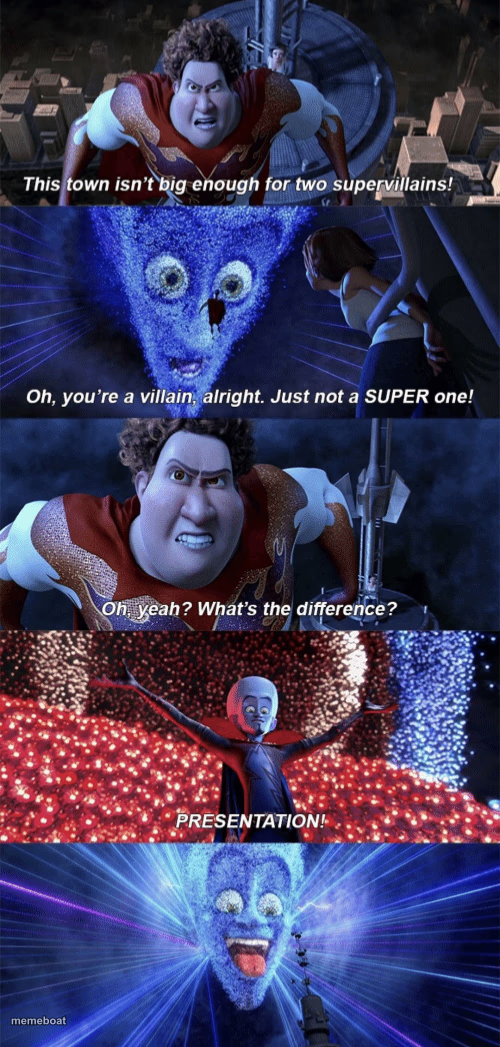
The Megamind 'Presentation!' four-panel showdown — a villain's big dramatic reveal. Caption your own version and download free.
Blank Presentation meme template
Download the blank Presentation template to caption it yourself, or add your text right here in the editor above and download the finished meme.
When to use the Presentation meme
- Responding to a challenge by dramatically overdoing everything
- Proving you're the real deal after someone doubts your credentials
- Any petty flex delivered with way too much production value
Presentation template facts
- Featuring
- Megamind
- Dimensions
- 500 × 1047 px
- Format
- PNG
- Text boxes
- 4
- Added
- 2025
About the Presentation meme template
This is peak Megamind: Titan smugly asking what makes him different from a real supervillain, and Megamind answering not with words but with an entire pyrotechnic light show, because obviously the difference is presentation. It's one of the most quotable villain-flex moments in animation.
Use this four-panel format anytime someone challenges your credentials and you respond by absolutely overdoing it. Petty flexes, dramatic reveals, or just showing off after being doubted — this template was built for main character energy.
Popular Presentation caption ideas
This meeting isn't big enough for two project leads! · Oh, you lead meetings alright. Just not a GOOD one! · Oh yeah? What's the difference? · SLIDES WITH ANIMATIONS!
This kitchen isn't big enough for two chefs! · Oh, you cook alright. Just not a TASTY one! · Oh yeah? What's the difference? · GARNISH!
This group chat isn't big enough for two comedians! · Oh, you're funny alright. Just not FUNNY funny! · Oh yeah? What's the difference? · TIMING!
Templates similar to Presentation

Presentation meme FAQ
How do I make a Presentation meme?
Scroll up to the Presentation template, type your caption into the 4 text boxes in the editor above, adjust the font, size and color if you like, then click download. Your finished Presentation meme is ready to share in seconds.
Can I use the Presentation template for free?
Yes. The Presentation template is completely free to use — no signup and no limits on how many memes you create or where you share them.
How do I download my Presentation meme?
Click the download button under the editor once your Presentation meme looks right. It saves straight to your device as a high-quality PNG or JPEG image.
How do I download the blank Presentation template?
Use the "Download blank template" button in the blank Presentation template section above to save the original, un-captioned image — handy if you'd rather caption it in another app or keep a copy.