
Pokemon Misty Cross Meme Generator
Create Your Pokemon Misty Cross Meme
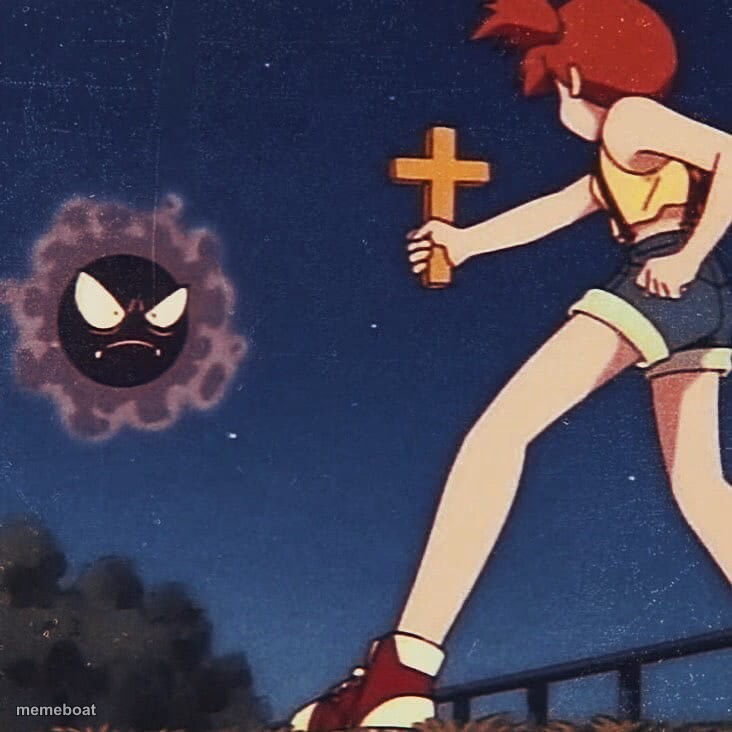
Misty from Pokemon holding up a cross to a menacing Gastly at night — a ready-made template for banishing anything annoying. Caption it free.
Blank Pokemon Misty Cross meme template
Download the blank Pokemon Misty Cross template to caption it yourself, or add your text right here in the editor above and download the finished meme.
When to use the Pokemon Misty Cross meme
- warding off a bad idea before it ruins your week
- banishing Mondays, exes, or your inner demons
- reacting to any unwanted intrusive thought
- telling anxiety to get out of your head
Pokemon Misty Cross template facts
- Featuring
- Misty (Pokemon)
- Dimensions
- 732 × 732 px
- Format
- JPG
- Added
- 2025
About the Pokemon Misty Cross meme template
Misty from the Pokemon anime, brandishing a cross like she's in a horror movie, aimed straight at a scowling Gastly cloud in the dark. It's dramatic, it's a little unhinged, and it's exactly the energy you need for banishing something (or someone) from your life.
Popular Pokemon Misty Cross caption ideas
Christian Moms
CHRISTIAN MOMS · ANYTHING POPULAR OUTSIDE OF CHURCH
Templates similar to Pokemon Misty Cross



Pokemon Misty Cross meme FAQ
How do I make a Pokemon Misty Cross meme?
Scroll up to the Pokemon Misty Cross template, add your own text boxes in the editor above and type your captions, adjust the font, size and color if you like, then click download. Your finished Pokemon Misty Cross meme is ready to share in seconds.
Can I use the Pokemon Misty Cross template for free?
Yes. The Pokemon Misty Cross template is completely free to use — no signup and no limits on how many memes you create or where you share them.
How do I download my Pokemon Misty Cross meme?
Click the download button under the editor once your Pokemon Misty Cross meme looks right. It saves straight to your device as a high-quality PNG or JPEG image.
How do I download the blank Pokemon Misty Cross template?
Use the "Download blank template" button in the blank Pokemon Misty Cross template section above to save the original, un-captioned image — handy if you'd rather caption it in another app or keep a copy.