
Pirate Telescope Meme Generator
Create Your Pirate Telescope Meme
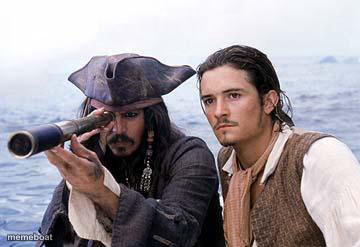
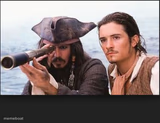
Jack Sparrow peers through his spyglass with Will Turner watching beside him, scanning the horizon for anything remotely dramatic. Free to caption on Memeboat.
Blank Pirate Telescope meme template
Download the blank Pirate Telescope template to caption it yourself, or add your text right here in the editor above and download the finished meme.
When to use the Pirate Telescope meme
- Squinting into the distance looking for your motivation
- Scanning the parking lot for one single open spot
- Searching the horizon for your ex's incoming text
- Looking for any sign that the weekend is close
Pirate Telescope template facts
- Featuring
- Jack Sparrow (Pirates of the Caribbean)
- Dimensions
- 360 × 247 px
- Format
- JPG
- Added
- 2025
About the Pirate Telescope meme template
Captain Jack Sparrow, ever the showman, squints through his telescope like he's spotted the Black Pearl itself — while Will Turner just stands there looking mildly concerned, as usual.
This is the ultimate 'searching for something that probably doesn't exist' template — your motivation, a parking spot, your ex texting back, or any faint hope on a distant horizon.
Templates similar to Pirate Telescope




Pirate Telescope meme FAQ
How do I make a Pirate Telescope meme?
Scroll up to the Pirate Telescope template, add your own text boxes in the editor above and type your captions, adjust the font, size and color if you like, then click download. Your finished Pirate Telescope meme is ready to share in seconds.
Can I use the Pirate Telescope template for free?
Yes. The Pirate Telescope template is completely free to use — no signup and no limits on how many memes you create or where you share them.
How do I download my Pirate Telescope meme?
Click the download button under the editor once your Pirate Telescope meme looks right. It saves straight to your device as a high-quality PNG or JPEG image.
How do I download the blank Pirate Telescope template?
Use the "Download blank template" button in the blank Pirate Telescope template section above to save the original, un-captioned image — handy if you'd rather caption it in another app or keep a copy.