
Ed Oh Shit Meme Generator
Create Your Ed Oh Shit Meme
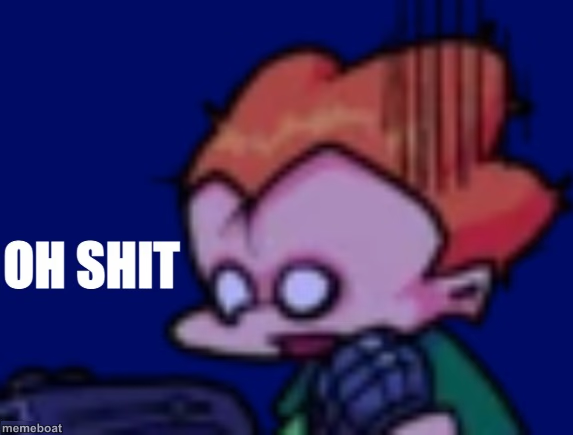
Ed from Ed, Edd n Eddy pulling a shocked 'oh shit' face against a dark blue background. Great for sudden dread reactions. Caption it free and download.
Blank Ed Oh Shit meme template
Download the blank Ed Oh Shit template to caption it yourself, or add your text right here in the editor above and download the finished meme.
When to use the Ed Oh Shit meme
- The moment you realize you hit reply-all
- Watching your code deploy straight to production by accident
- Realizing you left the stove on halfway to work
- Seeing your ex just liked your photo from 2019
Ed Oh Shit template facts
- Featuring
- Ed (Ed, Edd n Eddy)
- Dimensions
- 573 × 435 px
- Format
- PNG
- Text boxes
- 1
- Added
- 2025
About the Ed Oh Shit meme template
Ed's face frozen in pure oh-no mode, already captioned with the classic two words for when everything just went sideways. That blank space up top is basically asking you to explain exactly what went wrong.
Use it for the split second a plan falls apart, a text you shouldn't have sent goes through, or you realize you replied-all by accident.
Popular Ed Oh Shit caption ideas
Checking the group chat after I fell asleep at 9pm
When you realize you replied all
Remembering the assignment due in 10 minutes


Ed Oh Shit meme FAQ
How do I make a Ed Oh Shit meme?
Scroll up to the Ed Oh Shit template, type your caption into the text box in the editor above, adjust the font, size and color if you like, then click download. Your finished Ed Oh Shit meme is ready to share in seconds.
Can I use the Ed Oh Shit template for free?
Yes. The Ed Oh Shit template is completely free to use — no signup and no limits on how many memes you create or where you share them.
How do I download my Ed Oh Shit meme?
Click the download button under the editor once your Ed Oh Shit meme looks right. It saves straight to your device as a high-quality PNG or JPEG image.
How do I download the blank Ed Oh Shit template?
Use the "Download blank template" button in the blank Ed Oh Shit template section above to save the original, un-captioned image — handy if you'd rather caption it in another app or keep a copy.