
Picard frustrated Meme Generator
Create Your Picard frustrated Meme
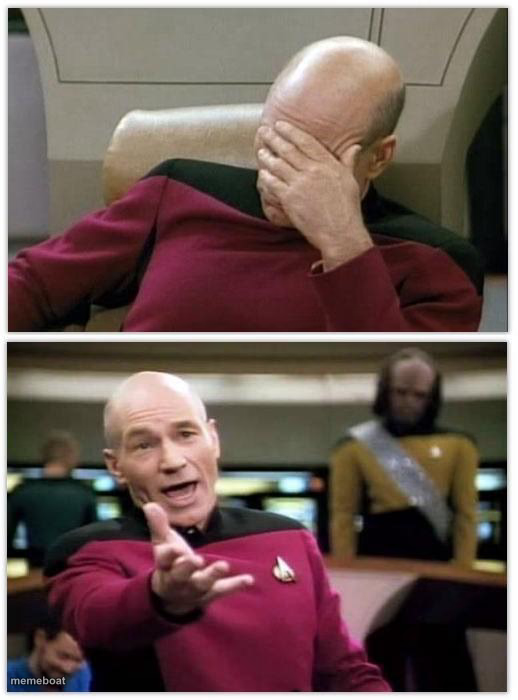
Captain Picard facepalming, then losing it with an exasperated gesture — the go-to two-panel template for pure disbelief. Free to caption and download.
Blank Picard frustrated meme template
Download the blank Picard frustrated template to caption it yourself, or add your text right here in the editor above and download the finished meme.
When to use the Picard frustrated meme
- When IT says 'have you tried turning it off and on again' for the fifth time
- Reading a reply-all email chain that should've stayed a DM
Picard frustrated template facts
- Featuring
- Captain Jean-Luc Picard (Star Trek: The Next Generation)
- Dimensions
- 518 × 700 px
- Format
- JPG
- Added
- 2025
About the Picard frustrated meme template
Top panel: Picard buries his face in his hand like he's aged ten years in ten seconds. Bottom panel: he's fully done, arm out, mid-rant at whoever caused it. It's the universal arc of 'I can't believe I have to deal with this' condensed into two frames.
Popular Picard frustrated caption ideas
I got unsubmitted for posting a Football meme in "Gaming" · but I still see "Fortnite" memes all over the "Fun" stream
Templates similar to Picard frustrated





Picard frustrated meme FAQ
How do I make a Picard frustrated meme?
Scroll up to the Picard frustrated template, add your own text boxes in the editor above and type your captions, adjust the font, size and color if you like, then click download. Your finished Picard frustrated meme is ready to share in seconds.
Can I use the Picard frustrated template for free?
Yes. The Picard frustrated template is completely free to use — no signup and no limits on how many memes you create or where you share them.
How do I download my Picard frustrated meme?
Click the download button under the editor once your Picard frustrated meme looks right. It saves straight to your device as a high-quality PNG or JPEG image.
How do I download the blank Picard frustrated template?
Use the "Download blank template" button in the blank Picard frustrated template section above to save the original, un-captioned image — handy if you'd rather caption it in another app or keep a copy.