
Peter vs sans Meme Generator
Create Your Peter vs sans Meme
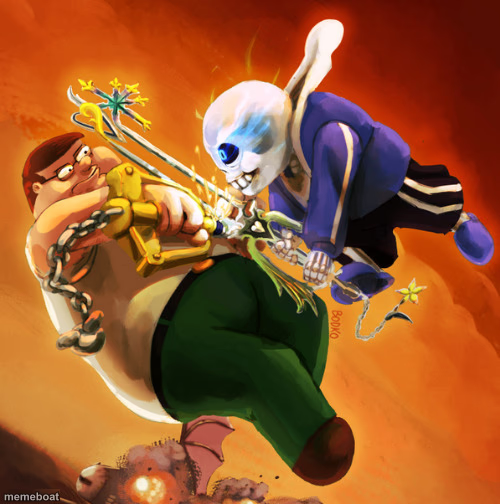
Peter Griffin locks blades with Undertale's Sans in an epic fan-art crossover clash. Caption the ultimate showdown free and download it instantly.
Blank Peter vs sans meme template
Download the blank Peter vs sans template to caption it yourself, or add your text right here in the editor above and download the finished meme.
When to use the Peter vs sans meme
- Any unlikely rivalry — sibling vs sibling, cat vs vacuum, intern vs printer
- Two things that should never fight, fighting anyway
- Overhyping a mundane disagreement as an epic showdown
- Crossover jokes between fandoms that don't belong together
Peter vs sans template facts
- Featuring
- Peter Griffin & Sans (Family Guy / Undertale crossover fan art)
- Dimensions
- 500 × 504 px
- Format
- JPG
- Added
- 2025
About the Peter vs sans meme template
Two completely unrelated universes collide: Peter Griffin, chained up and grimacing, going full anime-final-boss against Sans mid-attack with a glowing eye. Someone put way too much effort into this crossover and honestly, respect.
Popular Peter vs sans caption ideas
HOW IT FEELS · WHEN YOU AND BRO GRAB RANDOM STICKS FROM THE GROUND


Peter vs sans meme FAQ
How do I make a Peter vs sans meme?
Scroll up to the Peter vs sans template, add your own text boxes in the editor above and type your captions, adjust the font, size and color if you like, then click download. Your finished Peter vs sans meme is ready to share in seconds.
Can I use the Peter vs sans template for free?
Yes. The Peter vs sans template is completely free to use — no signup and no limits on how many memes you create or where you share them.
How do I download my Peter vs sans meme?
Click the download button under the editor once your Peter vs sans meme looks right. It saves straight to your device as a high-quality PNG or JPEG image.
How do I download the blank Peter vs sans template?
Use the "Download blank template" button in the blank Peter vs sans template section above to save the original, un-captioned image — handy if you'd rather caption it in another app or keep a copy.