
Parking spaces Meme Generator
Create Your Parking spaces Meme
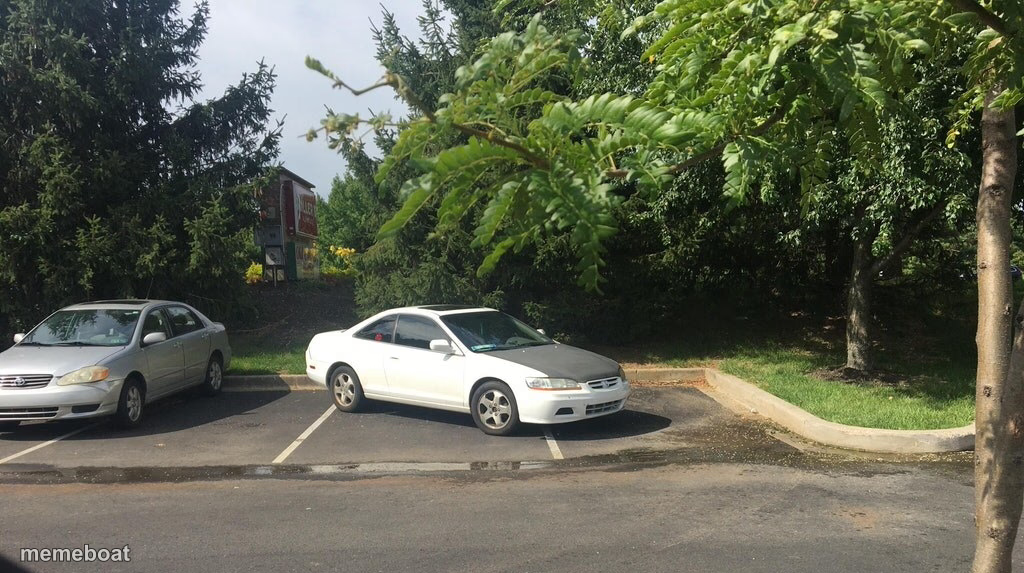
A parking lot with a white sedan taking up part of a neighboring spot next to a silver car. Caption it free for parking-shame and boundary jokes on memebo.at.
Blank Parking spaces meme template
Download the blank Parking spaces template to caption it yourself, or add your text right here in the editor above and download the finished meme.
When to use the Parking spaces meme
- When someone parks like they own both spots
- Reacting to a coworker who takes up more than their share of a meeting
- Any 'this is technically not against the rules but come on' moment
- Roommate leaves their stuff just slightly onto your side of the room
Parking spaces template facts
- Dimensions
- 1024 × 573 px
- Format
- PNG
- Added
- 2025
About the Parking spaces meme template
Two cars, one lot, and a parking job that's just slightly off-center enough to ruin someone's day. It's the visual equivalent of a passive-aggressive note left on a windshield.
Use this one for anything involving someone crowding your space, cutting it close, or just not quite respecting the line — literal parking disputes, roommates, shared Google Docs, whatever boundary got nudged today.
Templates similar to Parking spaces

Parking spaces meme FAQ
How do I make a Parking spaces meme?
Scroll up to the Parking spaces template, add your own text boxes in the editor above and type your captions, adjust the font, size and color if you like, then click download. Your finished Parking spaces meme is ready to share in seconds.
Can I use the Parking spaces template for free?
Yes. The Parking spaces template is completely free to use — no signup and no limits on how many memes you create or where you share them.
How do I download my Parking spaces meme?
Click the download button under the editor once your Parking spaces meme looks right. It saves straight to your device as a high-quality PNG or JPEG image.
How do I download the blank Parking spaces template?
Use the "Download blank template" button in the blank Parking spaces template section above to save the original, un-captioned image — handy if you'd rather caption it in another app or keep a copy.