
Papyrus Presentation Meme Generator
Create Your Papyrus Presentation Meme
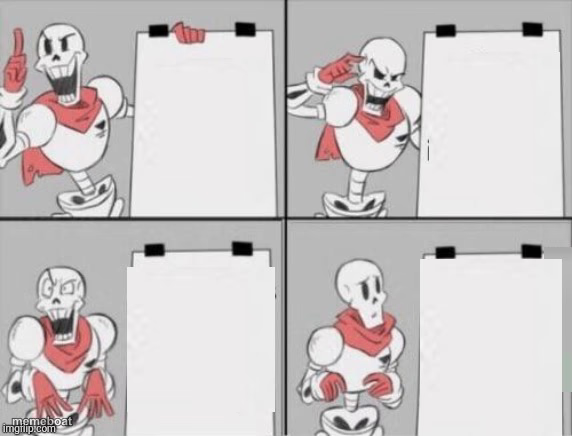
Papyrus from Undertale excitedly pitching a plan on a flip chart across four panels — perfect for mocking overconfident bad ideas.
Blank Papyrus Presentation meme template
Download the blank Papyrus Presentation template to caption it yourself, or add your text right here in the editor above and download the finished meme.
When to use the Papyrus Presentation meme
- Pitching a chaotic group project plan step by step
- Mocking an overconfident 'foolproof' scheme
- Building up a joke across escalating panels
- Presenting a plan with zero actual details
Papyrus Presentation template facts
- Featuring
- Papyrus (Undertale)
- Dimensions
- 572 × 436 px
- Format
- JPG
- Text boxes
- 4
- Added
- 2025
About the Papyrus Presentation meme template
Papyrus, everyone's favorite enthusiastic skeleton, cycles through four panels of increasingly confident poses next to a blank flip chart. He's clearly presenting something, and it's clearly a terrible plan he's way too excited about.
Use this for any multi-step 'genius plan' that's obviously going to fall apart, group project pitches, or that one friend who always has a scheme with zero details filled in.
Popular Papyrus Presentation caption ideas
Step 1: have an idea · Step 2: get excited about it · Step 3: tell no one the details · Step 4: profit somehow
My plan to fix my sleep schedule · Step one: stay up later · Step two: ??? · Step three: still tired
How I'll ask for a raise · First I'll build confidence · Then I'll rehearse it · Then I'll never actually ask
Templates similar to Papyrus Presentation







Papyrus Presentation meme FAQ
How do I make a Papyrus Presentation meme?
Scroll up to the Papyrus Presentation template, type your caption into the 4 text boxes in the editor above, adjust the font, size and color if you like, then click download. Your finished Papyrus Presentation meme is ready to share in seconds.
Can I use the Papyrus Presentation template for free?
Yes. The Papyrus Presentation template is completely free to use — no signup and no limits on how many memes you create or where you share them.
How do I download my Papyrus Presentation meme?
Click the download button under the editor once your Papyrus Presentation meme looks right. It saves straight to your device as a high-quality PNG or JPEG image.
How do I download the blank Papyrus Presentation template?
Use the "Download blank template" button in the blank Papyrus Presentation template section above to save the original, un-captioned image — handy if you'd rather caption it in another app or keep a copy.