
Ooooooo Meme Generator
Create Your Ooooooo Meme
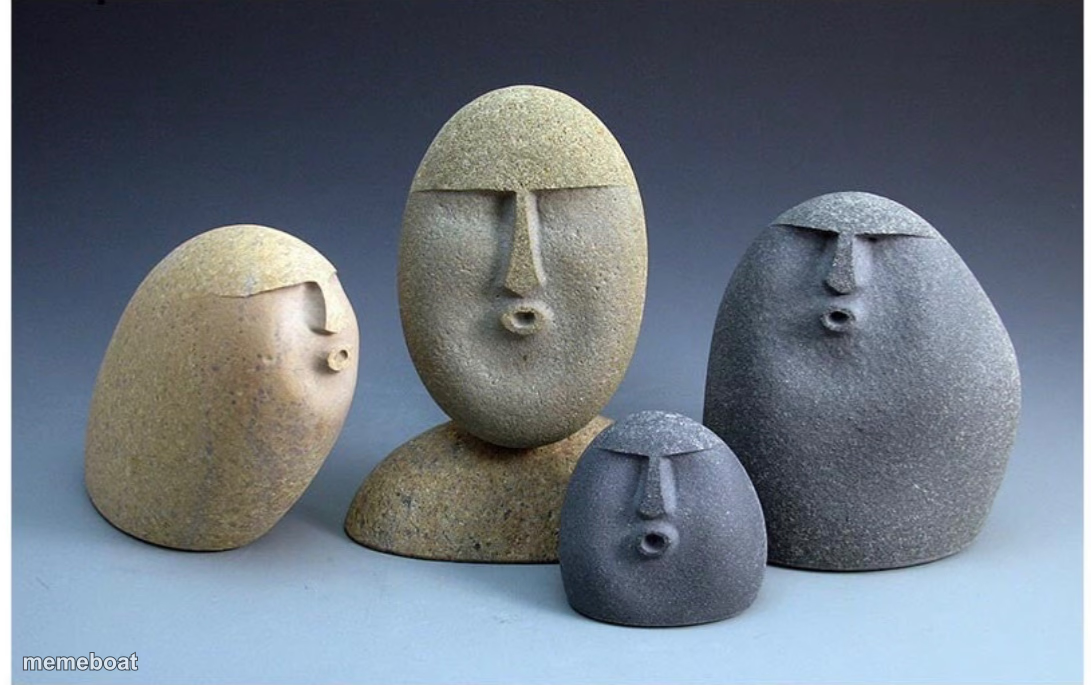
Four stone-carved rock faces mid "ooooo" gasp, big and small, staring in unison. Caption a group shock reaction and download free.
Blank Ooooooo meme template
Download the blank Ooooooo template to caption it yourself, or add your text right here in the editor above and download the finished meme.
When to use the Ooooooo meme
- The whole group chat when someone drops the tea
- Family reunion when the secret finally comes out
- The office when the merger email lands
- Friends watching the plot twist together
Ooooooo template facts
- Dimensions
- 1091 × 685 px
- Format
- PNG
- Text boxes
- 2
- Added
- 2025
About the Ooooooo meme template
Four little rock people with round "O" mouths caught mid-gasp, lined up like a family portrait carved by an artist with a great sense of humor. It's the perfect stand-in for that moment a whole group collectively loses it at the same piece of news.
Use it for the group chat that goes silent then explodes, the whole office hearing the layoff rumor at once, or the entire family reacting to grandma's DNA test results. Big rock, medium rock, tiny rock — everyone's shook.
Popular Ooooooo caption ideas
ENTIRE FAMILY · WHEN MOM SAYS "WE NEED TO TALK"
THE GROUP CHAT · AFTER THE SCREENSHOT DROPS
EVERYONE · FINDING OUT AT THE SAME TIME
Templates similar to Ooooooo




Ooooooo meme FAQ
How do I make a Ooooooo meme?
Scroll up to the Ooooooo template, type your caption into the 2 text boxes in the editor above, adjust the font, size and color if you like, then click download. Your finished Ooooooo meme is ready to share in seconds.
Can I use the Ooooooo template for free?
Yes. The Ooooooo template is completely free to use — no signup and no limits on how many memes you create or where you share them.
How do I download my Ooooooo meme?
Click the download button under the editor once your Ooooooo meme looks right. It saves straight to your device as a high-quality PNG or JPEG image.
How do I download the blank Ooooooo template?
Use the "Download blank template" button in the blank Ooooooo template section above to save the original, un-captioned image — handy if you'd rather caption it in another app or keep a copy.