
Oof face Meme Generator
Create Your Oof face Meme
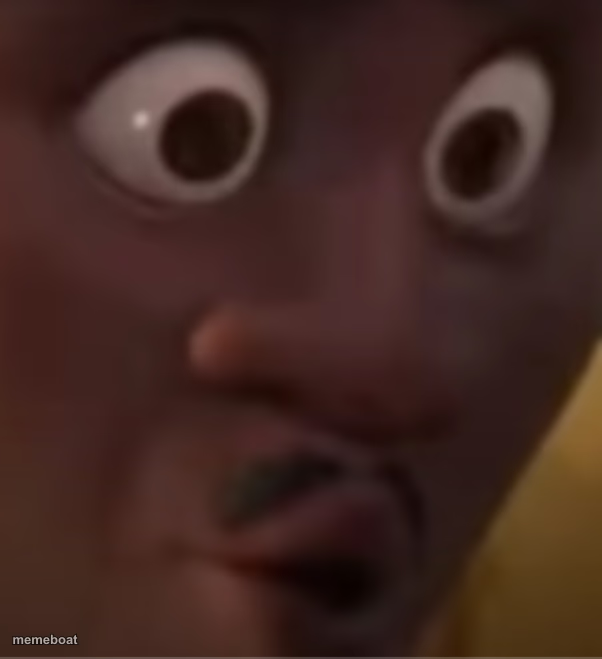
A close-up shocked, wide-eyed cartoon face with a scrunched mouth — perfect for reacting to cringe, awkward fails, or 'oof' moments. Caption it free.
Blank Oof face meme template
Download the blank Oof face template to caption it yourself, or add your text right here in the editor above and download the finished meme.
When to use the Oof face meme
- Reacting to someone's cringe-worthy decision in real time
- That face when you realize you replied-all by mistake
- Watching a friend's terrible dating choice unfold live
- The exact moment a plan goes horribly wrong
Oof face template facts
- Dimensions
- 602 × 659 px
- Format
- PNG
- Text boxes
- 2
- Added
- 2025
About the Oof face meme template
That face you make when someone shares something so cringe-worthy it physically hurts. Bulging eyes, scrunched nose, that little wince of a mouth — this close-up shock face nails the universal reaction to secondhand embarrassment, bad decisions, and pure unfiltered 'oof' energy.
Whether it's a friend's terrible life choice, a plot twist nobody asked for, or your own reflection after a rough day, this template says everything without saying a word. Drop your caption on top and let the face do the rest.
Popular Oof face caption ideas
when you hit 'reply all' · instead of 'reply'
me watching my friend · text their ex at 2am
that face when the waiter · says 'no refunds'
Templates similar to Oof face


Oof face meme FAQ
How do I make a Oof face meme?
Scroll up to the Oof face template, type your caption into the 2 text boxes in the editor above, adjust the font, size and color if you like, then click download. Your finished Oof face meme is ready to share in seconds.
Can I use the Oof face template for free?
Yes. The Oof face template is completely free to use — no signup and no limits on how many memes you create or where you share them.
How do I download my Oof face meme?
Click the download button under the editor once your Oof face meme looks right. It saves straight to your device as a high-quality PNG or JPEG image.
How do I download the blank Oof face template?
Use the "Download blank template" button in the blank Oof face template section above to save the original, un-captioned image — handy if you'd rather caption it in another app or keep a copy.