
Old man Typing Meme Generator
Create Your Old man Typing Meme
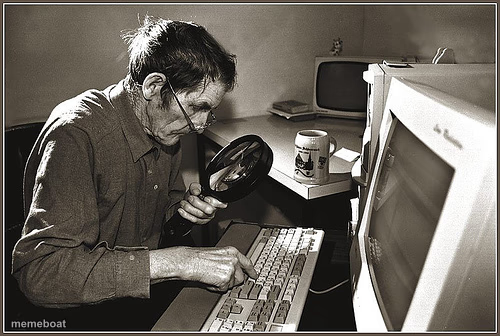
A classic sepia-toned stock photo of an elderly man squinting through a magnifying glass at his keyboard, the timeless picture of tech confusion. Caption free.
Blank Old man Typing meme template
Download the blank Old man Typing template to caption it yourself, or add your text right here in the editor above and download the finished meme.
When to use the Old man Typing meme
- Trying to read the fine print on a software update nobody asked for
- Squinting at a text message with tiny font for the first time
- Slowly typing a one-star review of an app you don't understand
- Trying to find the 'any' key your grandkid mentioned
Old man Typing template facts
- Dimensions
- 500 × 336 px
- Format
- JPG
- Text boxes
- 1
- Added
- 2025
About the Old man Typing meme template
This guy has been the face of 'boomers vs. technology' since before that was even a phrase. Magnifying glass in hand, hunt-and-peck posture locked in, fully committed to finding that one letter on the keyboard.
Popular Old man Typing caption ideas
THE MAN WHO INVENTED SPELL CHECK DIED YESTERDAY · MAY HE RUST IN PISS
ME TRYING TO FIND THE ANY KEY
TRYING TO READ THE TERMS AND CONDITIONS
WHEN THE FONT SIZE RESETS ITSELF AGAIN
Templates similar to Old man Typing




Old man Typing meme FAQ
How do I make a Old man Typing meme?
Scroll up to the Old man Typing template, type your caption into the text box in the editor above, adjust the font, size and color if you like, then click download. Your finished Old man Typing meme is ready to share in seconds.
Can I use the Old man Typing template for free?
Yes. The Old man Typing template is completely free to use — no signup and no limits on how many memes you create or where you share them.
How do I download my Old man Typing meme?
Click the download button under the editor once your Old man Typing meme looks right. It saves straight to your device as a high-quality PNG or JPEG image.
How do I download the blank Old man Typing template?
Use the "Download blank template" button in the blank Old man Typing template section above to save the original, un-captioned image — handy if you'd rather caption it in another app or keep a copy.