
OK Bye Mom Meme Generator
Create Your OK Bye Mom Meme
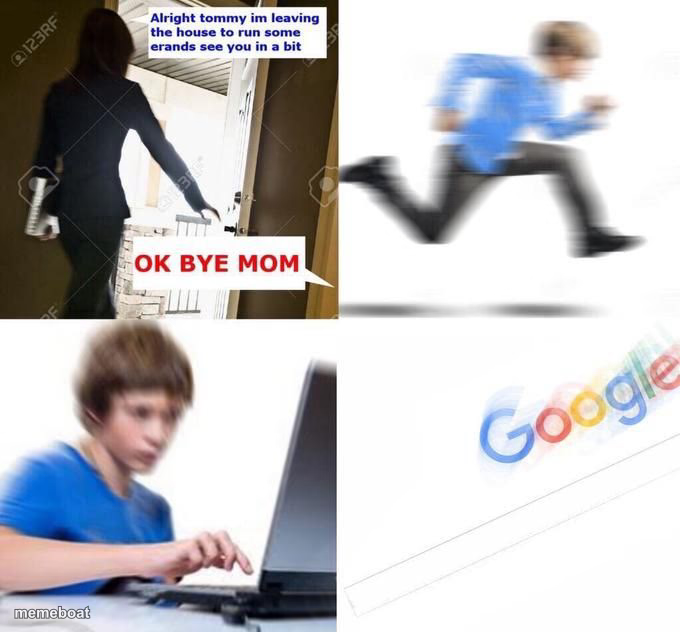
Mom leaves, kid sprints to the computer the second the door shuts. The classic 'the moment parents leave' template. Caption and download free.
Blank OK Bye Mom meme template
Download the blank OK Bye Mom template to caption it yourself, or add your text right here in the editor above and download the finished meme.
When to use the OK Bye Mom meme
- The instant your boss leaves for lunch and productivity ends
- What you do the second your roommate leaves the apartment
- Switching from 'homework' to literally anything else the moment you're alone
OK Bye Mom template facts
- Dimensions
- 680 × 632 px
- Format
- JPG
- Added
- 2025
About the OK Bye Mom meme template
Four panels, one universal truth: the second a parent walks out the door, the kid is already at full sprint toward whatever they weren't supposed to be doing. This template nails that exact half-second transition from innocent goodbye to chaos mode.
It's built for any 'the moment the coast is clear' joke — skipping the boring task, doing the thing you were told not to do, or just full-send freedom the instant supervision disappears.
Popular OK Bye Mom caption ideas
ANY ROBLOX 9 YR OLD CHILD · FREE ROBUX
Templates similar to OK Bye Mom

OK Bye Mom meme FAQ
How do I make a OK Bye Mom meme?
Scroll up to the OK Bye Mom template, add your own text boxes in the editor above and type your captions, adjust the font, size and color if you like, then click download. Your finished OK Bye Mom meme is ready to share in seconds.
Can I use the OK Bye Mom template for free?
Yes. The OK Bye Mom template is completely free to use — no signup and no limits on how many memes you create or where you share them.
How do I download my OK Bye Mom meme?
Click the download button under the editor once your OK Bye Mom meme looks right. It saves straight to your device as a high-quality PNG or JPEG image.
How do I download the blank OK Bye Mom template?
Use the "Download blank template" button in the blank OK Bye Mom template section above to save the original, un-captioned image — handy if you'd rather caption it in another app or keep a copy.