
Inspector Pointer Not That Meme Generator
Create Your Inspector Pointer Not That Meme
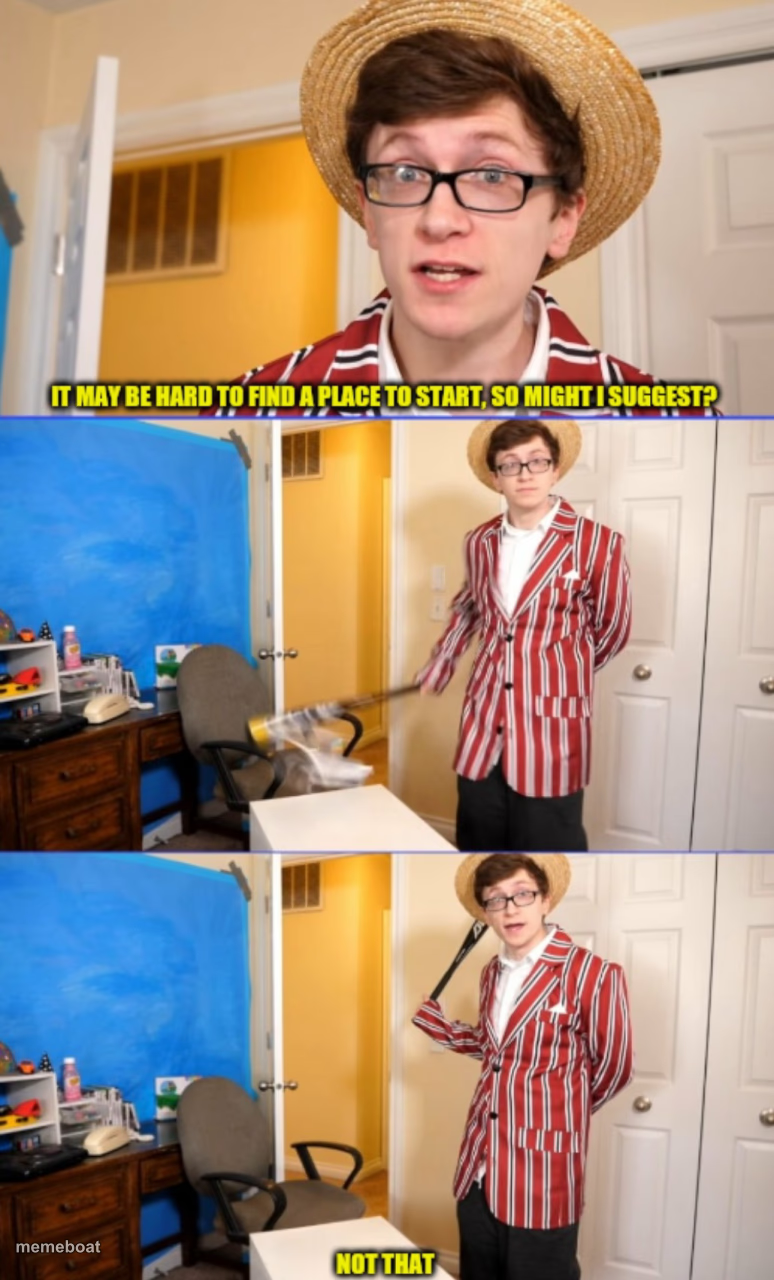
Straw-hat guy with a pointer stick calling out 'not that' in a cluttered room. Caption your own bad suggestion and download free.
Blank Inspector Pointer Not That meme template
Download the blank Inspector Pointer Not That template to caption it yourself, or add your text right here in the editor above and download the finished meme.
When to use the Inspector Pointer Not That meme
- Someone suggests the obvious fix and it gets rejected instantly
- Pointing out every wrong answer before finally landing on the right one
- A messy room getting inspected item by item, and nothing passes
- Reacting to a bad idea in a meeting by shutting it down immediately
Inspector Pointer Not That template facts
- Dimensions
- 774 × 1280 px
- Format
- JPG
- Text boxes
- 3
- Added
- 2025
About the Inspector Pointer Not That meme template
This one's got main character energy: a guy in a boater hat and candy-stripe blazer, pointer stick in hand, ready to helpfully suggest a place to start... and then immediately reject it. It's the perfect template for any moment where the obvious answer gets shot down for no good reason.
Use it whenever someone offers up a suggestion, a starting point, or an excuse, and the answer is a flat, theatrical 'not that.' Caption it with your own overruled ideas, add your own object of rejection, and download it free to drop into group chats, work threads, or wherever someone needs to be politely told no.
Popular Inspector Pointer Not That caption ideas
Might I suggest we start with your diet? · Not that either · Okay, your sleep schedule then
Where should we begin fixing your life? · Not that · How about literally anywhere else
Let's find the bug in your code · Not that · Also not that, and definitely not that
Templates similar to Inspector Pointer Not That


Inspector Pointer Not That meme FAQ
How do I make a Inspector Pointer Not That meme?
Scroll up to the Inspector Pointer Not That template, type your caption into the 3 text boxes in the editor above, adjust the font, size and color if you like, then click download. Your finished Inspector Pointer Not That meme is ready to share in seconds.
Can I use the Inspector Pointer Not That template for free?
Yes. The Inspector Pointer Not That template is completely free to use — no signup and no limits on how many memes you create or where you share them.
How do I download my Inspector Pointer Not That meme?
Click the download button under the editor once your Inspector Pointer Not That meme looks right. It saves straight to your device as a high-quality PNG or JPEG image.
How do I download the blank Inspector Pointer Not That template?
Use the "Download blank template" button in the blank Inspector Pointer Not That template section above to save the original, un-captioned image — handy if you'd rather caption it in another app or keep a copy.