
Noise no- Meme Generator
Create Your Noise no- Meme
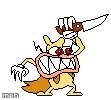
Pixel-art dog gritting its teeth and gripping a knife overhead, ready to strike. Add your own caption and download free.
Blank Noise no- meme template
Download the blank Noise no- template to caption it yourself, or add your text right here in the editor above and download the finished meme.
When to use the Noise no- meme
- When someone touches your leftovers in the office fridge one too many times
- That moment right before you respond to a group chat that's gone too far
Noise no- template facts
- Dimensions
- 111 × 100 px
- Format
- PNG
- Text boxes
- 2
- Added
- 2025
About the Noise no- meme template
This little pixel dog has had enough. Fists clenched, eyes narrowed, knife raised over its head like it's about to settle something once and for all — it's the perfect stand-in for that split-second before you snap.
Use it for petty office drama, roommate disputes over dishes, or any moment your patience finally runs out. No signup, just caption it and go.
Popular Noise no- caption ideas
TO PROVE IMGFLIPPERS SOMETIMES UPVOTE ANYTHING: · THE NOISE
WHO TOUCHED MY LEFTOVERS · THIS ENDS TODAY
ME HEARING MY NAME IN A GROUP CHAT · TIME TO FIND OUT WHY
WHEN THE WIFI DROPS MID-BOSS FIGHT · SOMEONE'S PAYING FOR THIS
Templates similar to Noise no-
Noise no- meme FAQ
How do I make a Noise no- meme?
Scroll up to the Noise no- template, type your caption into the 2 text boxes in the editor above, adjust the font, size and color if you like, then click download. Your finished Noise no- meme is ready to share in seconds.
Can I use the Noise no- template for free?
Yes. The Noise no- template is completely free to use — no signup and no limits on how many memes you create or where you share them.
How do I download my Noise no- meme?
Click the download button under the editor once your Noise no- meme looks right. It saves straight to your device as a high-quality PNG or JPEG image.
How do I download the blank Noise no- template?
Use the "Download blank template" button in the blank Noise no- template section above to save the original, un-captioned image — handy if you'd rather caption it in another app or keep a copy.