
Nevada Meme Generator
Create Your Nevada Meme
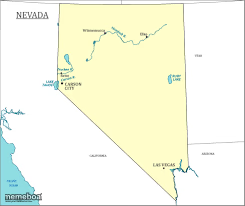
A plain outline map of Nevada with cities and lakes labeled — great for state pride jokes, geography humor, or Vegas references. Caption it free, no sign-up.
Blank Nevada meme template
Download the blank Nevada template to caption it yourself, or add your text right here in the editor above and download the finished meme.
When to use the Nevada meme
- Making a joke about what happens in Vegas staying in Vegas
- Roasting a state that's mostly desert
- Explaining a road trip that went nowhere fast
- Geography class flashbacks
Nevada template facts
- Dimensions
- 245 × 206 px
- Format
- PNG
- Text boxes
- 1
- Added
- 2025
About the Nevada meme template
Just a straightforward map of Nevada, complete with Las Vegas tucked down in the corner and a scatter of lakes nobody can name. It's the kind of image nobody expects to be funny, which is exactly why it works.
Use it for jokes about 'what happens in Vegas,' desert road trips gone wrong, or roasting a state that's mostly just... a lot of empty space. Great for the geography-nerd crowd too.
Popular Nevada caption ideas
what my plans look like: 90% empty space, 10% chaos in one corner
Nevada: population Las Vegas and some rocks
me explaining my life plan: mostly empty, one bold decision in the corner
Nevada meme FAQ
How do I make a Nevada meme?
Scroll up to the Nevada template, type your caption into the text box in the editor above, adjust the font, size and color if you like, then click download. Your finished Nevada meme is ready to share in seconds.
Can I use the Nevada template for free?
Yes. The Nevada template is completely free to use — no signup and no limits on how many memes you create or where you share them.
How do I download my Nevada meme?
Click the download button under the editor once your Nevada meme looks right. It saves straight to your device as a high-quality PNG or JPEG image.
How do I download the blank Nevada template?
Use the "Download blank template" button in the blank Nevada template section above to save the original, un-captioned image — handy if you'd rather caption it in another app or keep a copy.