
Mystery Flight Meme Generator
Create Your Mystery Flight Meme
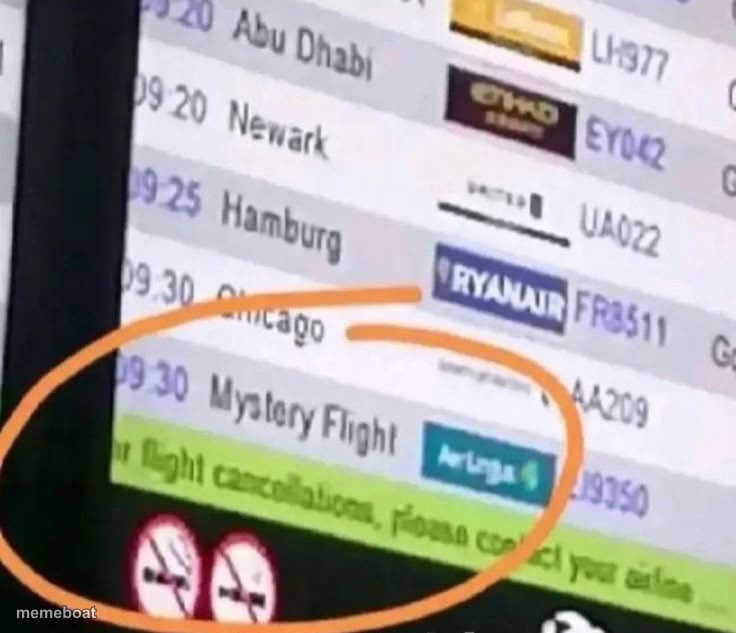
An airport departures board circled around a flight literally labeled 'Mystery Flight' — great template for surprise, uncertainty, or 'no idea what happens next' jokes. Free to caption and download.
Blank Mystery Flight meme template
Download the blank Mystery Flight template to caption it yourself, or add your text right here in the editor above and download the finished meme.
When to use the Mystery Flight meme
- Describing plans with zero information, like a group trip nobody explained
- Captioning a surprise life decision with an unknown outcome
- Joking about Monday mornings feeling like an unplanned destination
Mystery Flight template facts
- Dimensions
- 736 × 633 px
- Format
- PNG
- Text boxes
- 1
- Added
- 2025
About the Mystery Flight meme template
A departures screen at an airport, orange-circled around a real listing that just says 'Mystery Flight' with no destination given — which is somehow both real and the most relatable metaphor for not knowing what's coming next.
Popular Mystery Flight caption ideas
😭 · Where are they going?
MY 2026 PLANS RIGHT NOW
WHAT MY THERAPIST CALLS 'GROWTH'
ME AGREEING TO A ROAD TRIP WITH NO ITINERARY



Mystery Flight meme FAQ
How do I make a Mystery Flight meme?
Scroll up to the Mystery Flight template, type your caption into the text box in the editor above, adjust the font, size and color if you like, then click download. Your finished Mystery Flight meme is ready to share in seconds.
Can I use the Mystery Flight template for free?
Yes. The Mystery Flight template is completely free to use — no signup and no limits on how many memes you create or where you share them.
How do I download my Mystery Flight meme?
Click the download button under the editor once your Mystery Flight meme looks right. It saves straight to your device as a high-quality PNG or JPEG image.
How do I download the blank Mystery Flight template?
Use the "Download blank template" button in the blank Mystery Flight template section above to save the original, un-captioned image — handy if you'd rather caption it in another app or keep a copy.