
Multi Monitor Setup Meme Generator
A person's hand holds a smartphone in the foreground, displaying a dark-themed interface with cryptocurrency trading data, while a laptop with similar…
Create Your Multi Monitor Setup Meme
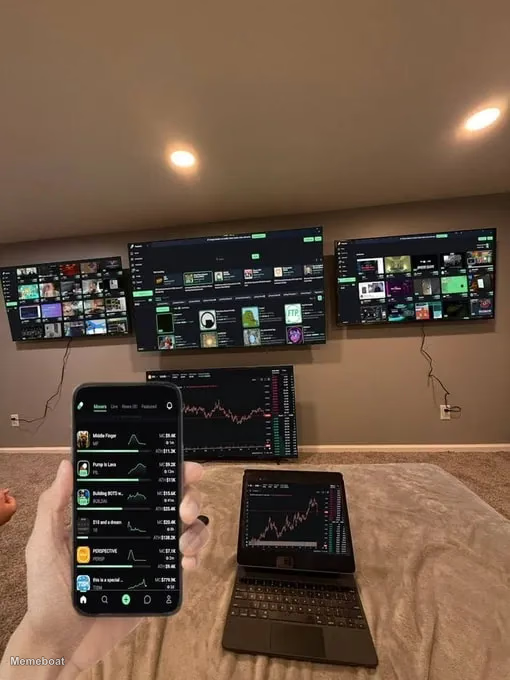
Blank Multi Monitor Setup meme template
Download the blank Multi Monitor Setup template to caption it yourself, or add your text right here in the editor above and download the finished meme.
Multi Monitor Setup template facts
- Dimensions
- 510 × 680 px
- Format
- WEBP
- Text boxes
- 2
- Added
- 2026
About the Multi Monitor Setup meme template
A person's hand holds a smartphone in the foreground, displaying a dark-themed interface with cryptocurrency trading data, while a laptop with similar financial charts rests on a light-colored blanket. In the background, four large flat-screen monitors are mounted on a wall, creating an elaborate multi-monitor setup. One of the bottom screens clearly shows detailed financial graphs, consistent with the devices in the foreground, while the other screens display various content, including grids of images or video thumbnails, suggesting a command center or entertainment hub.
Popular Multi Monitor Setup caption ideas
The female mind cannot comprehend this

Multi Monitor Setup meme FAQ
How do I make a Multi Monitor Setup meme?
Scroll up to the Multi Monitor Setup template, type your caption into the 2 text boxes in the editor above, adjust the font, size and color if you like, then click download. Your finished Multi Monitor Setup meme is ready to share in seconds.
Can I use the Multi Monitor Setup template for free?
Yes. The Multi Monitor Setup template is completely free to use — no signup and no limits on how many memes you create or where you share them.
How do I download my Multi Monitor Setup meme?
Click the download button under the editor once your Multi Monitor Setup meme looks right. It saves straight to your device as a high-quality PNG or JPEG image.
How do I download the blank Multi Monitor Setup template?
Use the "Download blank template" button in the blank Multi Monitor Setup template section above to save the original, un-captioned image — handy if you'd rather caption it in another app or keep a copy.