
Mugshot to go Meme Generator
Create Your Mugshot to go Meme
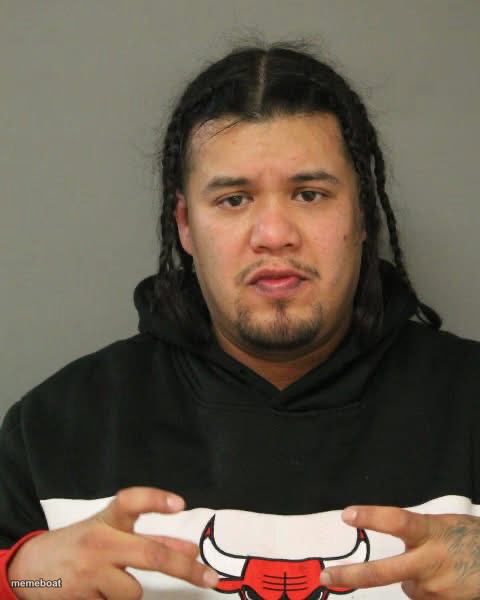
A deadpan mugshot guy in a Chicago Bulls hoodie, hands cuffed up front. Caption his unbothered stare and download free.
Blank Mugshot to go meme template
Download the blank Mugshot to go template to caption it yourself, or add your text right here in the editor above and download the finished meme.
When to use the Mugshot to go meme
- when you get caught red-handed and just accept it
- reacting to consequences with zero remorse
- the face you make explaining yourself to HR
Mugshot to go template facts
- Dimensions
- 480 × 600 px
- Format
- JPG
- Text boxes
- 2
- Added
- 2025
About the Mugshot to go meme template
Nobody has ever looked less impressed by being arrested. This guy's rocking a Bulls hoodie, hands folded like he's waiting for a bus, and a face that says 'yeah, and?' It's the perfect template for that unbothered, seen-it-all energy.
Use it for anything where someone got caught red-handed but still isn't stressed about it — from workplace fails to relationship drama to just admitting you did the crime.
Popular Mugshot to go caption ideas
ME AFTER GETTING CAUGHT · STILL NOT SORRY
"ANYTHING TO SAY?" · NAH I'M GOOD
WHEN THEY ASK IF YOU DID IT · OBVIOUSLY
Templates similar to Mugshot to go

Mugshot to go meme FAQ
How do I make a Mugshot to go meme?
Scroll up to the Mugshot to go template, type your caption into the 2 text boxes in the editor above, adjust the font, size and color if you like, then click download. Your finished Mugshot to go meme is ready to share in seconds.
Can I use the Mugshot to go template for free?
Yes. The Mugshot to go template is completely free to use — no signup and no limits on how many memes you create or where you share them.
How do I download my Mugshot to go meme?
Click the download button under the editor once your Mugshot to go meme looks right. It saves straight to your device as a high-quality PNG or JPEG image.
How do I download the blank Mugshot to go template?
Use the "Download blank template" button in the blank Mugshot to go template section above to save the original, un-captioned image — handy if you'd rather caption it in another app or keep a copy.