
Mr Burns Muahaha Meme Generator
Create Your Mr Burns Muahaha Meme
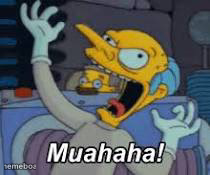
Mr. Burns cackling evil laugh from The Simpsons — perfect for scheming, petty revenge, or evil-plan energy. Caption it and download free.
Blank Mr Burns Muahaha meme template
Download the blank Mr Burns Muahaha template to caption it yourself, or add your text right here in the editor above and download the finished meme.
When to use the Mr Burns Muahaha meme
- Getting away with a petty scheme at work or school
- Announcing a plan is finally coming together
- Reacting to someone else's downfall you secretly caused
- Petty revenge finally paying off
Mr Burns Muahaha template facts
- Featuring
- Mr. Burns (The Simpsons)
- Dimensions
- 210 × 175 px
- Format
- JPG
- Added
- 2025
About the Mr Burns Muahaha meme template
Mr. Burns doing his signature clawed-fingers cackle is basically the OG villain reaction shot. Whatever tiny, petty, deeply unnecessary scheme you're about to pull off, this is the face for it.
Use it for that moment you get away with something you probably shouldn't have, plotting revenge over something small, or just announcing to the world that your plan is finally coming together. Excellent.
Templates similar to Mr Burns Muahaha
Mr Burns Muahaha meme FAQ
How do I make a Mr Burns Muahaha meme?
Scroll up to the Mr Burns Muahaha template, add your own text boxes in the editor above and type your captions, adjust the font, size and color if you like, then click download. Your finished Mr Burns Muahaha meme is ready to share in seconds.
Can I use the Mr Burns Muahaha template for free?
Yes. The Mr Burns Muahaha template is completely free to use — no signup and no limits on how many memes you create or where you share them.
How do I download my Mr Burns Muahaha meme?
Click the download button under the editor once your Mr Burns Muahaha meme looks right. It saves straight to your device as a high-quality PNG or JPEG image.
How do I download the blank Mr Burns Muahaha template?
Use the "Download blank template" button in the blank Mr Burns Muahaha template section above to save the original, un-captioned image — handy if you'd rather caption it in another app or keep a copy.