
Most useless things Meme Generator
Create Your Most useless things Meme
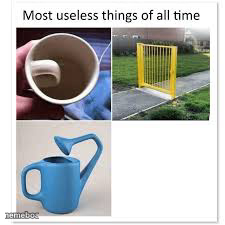
Three objects designed wrong on purpose — a handle-less mug, a fence with no fence, and a backwards watering can spout. Peak uselessness, free to caption.
Blank Most useless things meme template
Download the blank Most useless things template to caption it yourself, or add your text right here in the editor above and download the finished meme.
When to use the Most useless things meme
- Roasting badly designed products
- Calling out effort that accomplishes nothing
- Reacting to 'technically correct but useless' solutions
- Comparing three equally pointless things
Most useless things template facts
- Dimensions
- 225 × 225 px
- Format
- JPG
- Added
- 2025
About the Most useless things meme template
A dark mug with the handle carved on the inside where your fingers can't fit, a yellow fence gate standing alone with zero fence attached to it, and a watering can with its spout pointing the wrong way — three objects that technically exist but functionally do nothing.
Perfect template for roasting bad design, pointless effort, or anything that looks useful but absolutely is not.
Templates similar to Most useless things
Most useless things meme FAQ
How do I make a Most useless things meme?
Scroll up to the Most useless things template, add your own text boxes in the editor above and type your captions, adjust the font, size and color if you like, then click download. Your finished Most useless things meme is ready to share in seconds.
Can I use the Most useless things template for free?
Yes. The Most useless things template is completely free to use — no signup and no limits on how many memes you create or where you share them.
How do I download my Most useless things meme?
Click the download button under the editor once your Most useless things meme looks right. It saves straight to your device as a high-quality PNG or JPEG image.
How do I download the blank Most useless things template?
Use the "Download blank template" button in the blank Most useless things template section above to save the original, un-captioned image — handy if you'd rather caption it in another app or keep a copy.