
moonstar_mobile bingo V2 Meme Generator
Create Your moonstar_mobile bingo V2 Meme
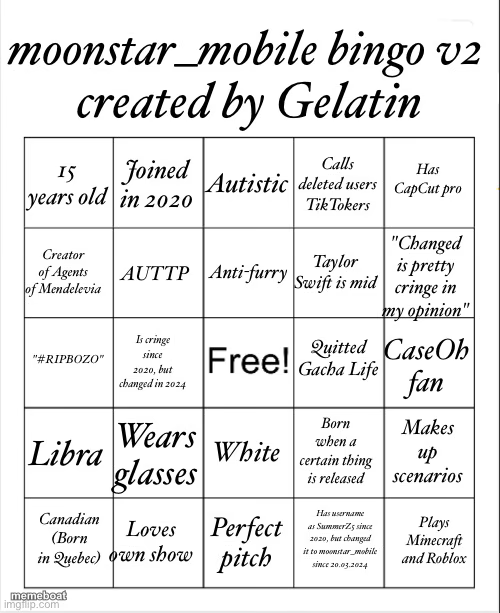
A community bingo card of niche fandom callouts — great as a shareable checklist template. Caption and download free.
Blank moonstar_mobile bingo V2 meme template
Download the blank moonstar_mobile bingo V2 template to caption it yourself, or add your text right here in the editor above and download the finished meme.
When to use the moonstar_mobile bingo V2 meme
- Making a callout bingo for a specific online fandom or persona
- Roasting a friend by checking off traits that apply to them
- Turning inside jokes about a group chat into a shareable grid
moonstar_mobile bingo V2 template facts
- Dimensions
- 500 × 613 px
- Format
- JPG
- Added
- 2025
About the moonstar_mobile bingo V2 meme template
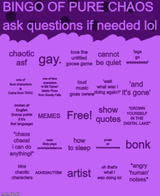
A fully-loaded bingo card poking fun at a very specific internet persona — deleted TikToks, anti-furry takes, CapCut Pro, quitting Gacha Life. It's the format where you check every box that applies to you (or your weird online friend).
Great as a template for making your own callout bingo about any fandom, friend group, or type of person you know too well.
Templates similar to moonstar_mobile bingo V2




moonstar_mobile bingo V2 meme FAQ
How do I make a moonstar_mobile bingo V2 meme?
Scroll up to the moonstar_mobile bingo V2 template, add your own text boxes in the editor above and type your captions, adjust the font, size and color if you like, then click download. Your finished moonstar_mobile bingo V2 meme is ready to share in seconds.
Can I use the moonstar_mobile bingo V2 template for free?
Yes. The moonstar_mobile bingo V2 template is completely free to use — no signup and no limits on how many memes you create or where you share them.
How do I download my moonstar_mobile bingo V2 meme?
Click the download button under the editor once your moonstar_mobile bingo V2 meme looks right. It saves straight to your device as a high-quality PNG or JPEG image.
How do I download the blank moonstar_mobile bingo V2 template?
Use the "Download blank template" button in the blank moonstar_mobile bingo V2 template section above to save the original, un-captioned image — handy if you'd rather caption it in another app or keep a copy.