
Wide-Eyed Cat Stare Meme Generator
Create Your Wide-Eyed Cat Stare Meme
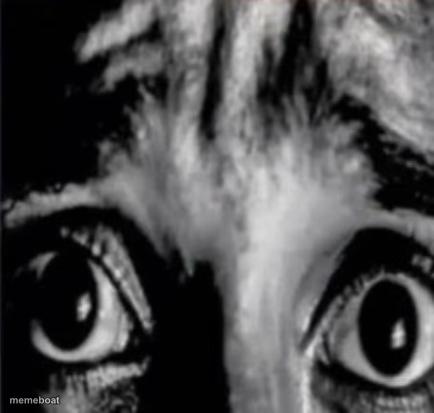
An extreme close-up crop of a cat's furrowed brow and wide staring eyes — perfect for that moment of pure disbelief. Caption it free on Memebo.at.
Blank Wide-Eyed Cat Stare meme template
Download the blank Wide-Eyed Cat Stare template to caption it yourself, or add your text right here in the editor above and download the finished meme.
Wide-Eyed Cat Stare template facts
- Dimensions
- 434 × 413 px
- Format
- PNG
- Text boxes
- 2
- Added
- 2025
About the Wide-Eyed Cat Stare meme template
Zoomed in so tight you can practically feel the cat judging your life choices. Those stripes over the eyes read like furious eyebrows, and the pupils are locked dead-center, unblinking, like it just watched you do something unforgivable.
Use this one for the split-second reaction to bad news, a plot twist, or that text message you shouldn't have sent. It's a stare that says "I saw that" without a single word.
Popular Wide-Eyed Cat Stare caption ideas
MFW · the wifi finally comes back after 3 days
When you hear your name · in a conversation you weren't part of
Me pretending · I understood anything in that meeting
Templates similar to Wide-Eyed Cat Stare

Wide-Eyed Cat Stare meme FAQ
How do I make a Wide-Eyed Cat Stare meme?
Scroll up to the Wide-Eyed Cat Stare template, type your caption into the 2 text boxes in the editor above, adjust the font, size and color if you like, then click download. Your finished Wide-Eyed Cat Stare meme is ready to share in seconds.
Can I use the Wide-Eyed Cat Stare template for free?
Yes. The Wide-Eyed Cat Stare template is completely free to use — no signup and no limits on how many memes you create or where you share them.
How do I download my Wide-Eyed Cat Stare meme?
Click the download button under the editor once your Wide-Eyed Cat Stare meme looks right. It saves straight to your device as a high-quality PNG or JPEG image.
How do I download the blank Wide-Eyed Cat Stare template?
Use the "Download blank template" button in the blank Wide-Eyed Cat Stare template section above to save the original, un-captioned image — handy if you'd rather caption it in another app or keep a copy.