
Meap Meme Generator
Create Your Meap Meme
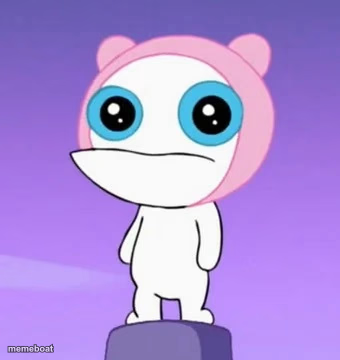
Meap, the deadpan pink alien from Phineas and Ferb, standing with a totally unbothered blank stare. Perfect for flat, unimpressed reactions. Free to caption.
Blank Meap meme template
Download the blank Meap template to caption it yourself, or add your text right here in the editor above and download the finished meme.
When to use the Meap meme
- Reacting to chaos with zero emotion left to give
- Hearing bad news for the fifth time today
- Watching someone explain something you already knew was wrong
- That flat stare after a truly unhinged plot twist
Meap template facts
- Featuring
- Meap (Phineas and Ferb)
- Dimensions
- 340 × 360 px
- Format
- JPG
- Text boxes
- 2
- Added
- 2025
About the Meap meme template
Meap has the most perfectly blank, unbothered stare in cartoon history — big round eyes, flat mouth, zero reaction to whatever chaos is happening around him. He's basically a walking "I have seen everything and nothing surprises me anymore" energy.
Use him for deadpan reactions, dry sarcasm, or those moments where something wild just happened and you have absolutely nothing left to give emotionally.
Popular Meap caption ideas
I AM THE · GLOBGLOGABGALAB
MY FACE WHEN MONDAY · SHOWS UP AGAIN
ME AFTER HEARING · "WE NEED TO TALK"
WHEN THE PLAN FAILS · FOR THE THIRD TIME THIS WEEK
Templates similar to Meap



Meap meme FAQ
How do I make a Meap meme?
Scroll up to the Meap template, type your caption into the 2 text boxes in the editor above, adjust the font, size and color if you like, then click download. Your finished Meap meme is ready to share in seconds.
Can I use the Meap template for free?
Yes. The Meap template is completely free to use — no signup and no limits on how many memes you create or where you share them.
How do I download my Meap meme?
Click the download button under the editor once your Meap meme looks right. It saves straight to your device as a high-quality PNG or JPEG image.
How do I download the blank Meap template?
Use the "Download blank template" button in the blank Meap template section above to save the original, un-captioned image — handy if you'd rather caption it in another app or keep a copy.