
Body Labeling Chart Meme Generator
Create Your Body Labeling Chart Meme
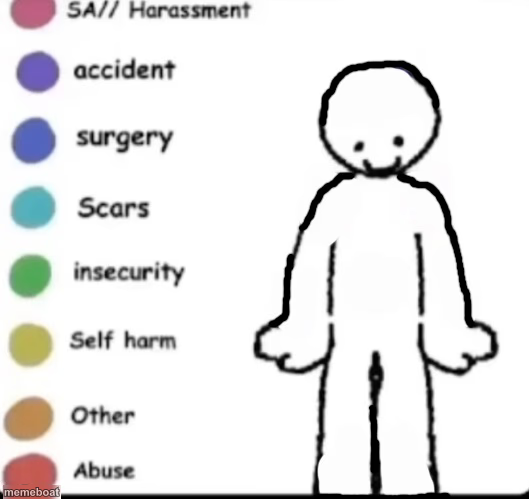
A blank stick-figure body diagram with a color-coded legend for labeling different topics — customize the labels and body regions with your own captions for free.
Blank Body Labeling Chart meme template
Download the blank Body Labeling Chart template to caption it yourself, or add your text right here in the editor above and download the finished meme.
When to use the Body Labeling Chart meme
- Mapping out categories of anything onto a simple diagram
- Making a lighthearted 'rate my whole personality' chart
- Sorting your problems into color-coded buckets
- Building a tier list using body regions as categories
Body Labeling Chart template facts
- Dimensions
- 529 × 499 px
- Format
- JPG
- Added
- 2025
About the Body Labeling Chart meme template
This is that color-key diagram format where a simple stick figure gets broken down into labeled sections, each tied to a colored dot in a legend. It started as a serious template for mapping personal experiences, but the format itself has been remixed for all kinds of lighthearted "map this to my life" content.
Templates similar to Body Labeling Chart




Body Labeling Chart meme FAQ
How do I make a Body Labeling Chart meme?
Scroll up to the Body Labeling Chart template, add your own text boxes in the editor above and type your captions, adjust the font, size and color if you like, then click download. Your finished Body Labeling Chart meme is ready to share in seconds.
Can I use the Body Labeling Chart template for free?
Yes. The Body Labeling Chart template is completely free to use — no signup and no limits on how many memes you create or where you share them.
How do I download my Body Labeling Chart meme?
Click the download button under the editor once your Body Labeling Chart meme looks right. It saves straight to your device as a high-quality PNG or JPEG image.
How do I download the blank Body Labeling Chart template?
Use the "Download blank template" button in the blank Body Labeling Chart template section above to save the original, un-captioned image — handy if you'd rather caption it in another app or keep a copy.