
Mad dog Meme Generator
Create Your Mad dog Meme
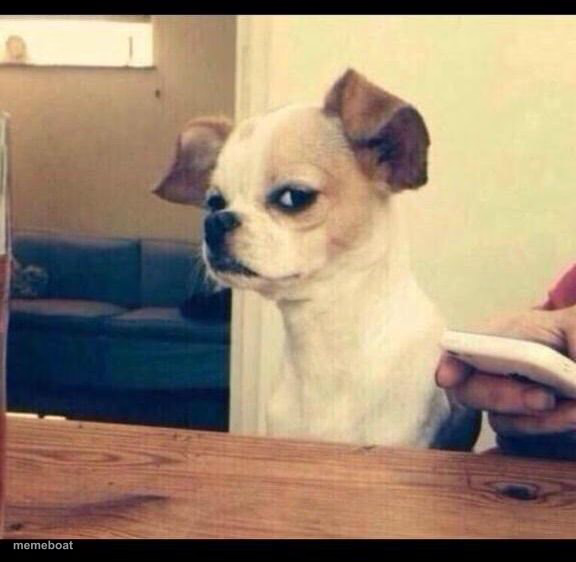
A tiny chihuahua gives major side-eye while being handed a phone — the ultimate 'I don't trust this' reaction. Caption and download this classic meme free.
Blank Mad dog meme template
Download the blank Mad dog template to caption it yourself, or add your text right here in the editor above and download the finished meme.
When to use the Mad dog meme
- Being handed 'proof' you already know is fake
- Reacting to a suspiciously good deal or offer
- Your friend showing you a text and saying 'it's not that deep'
- When someone says 'trust me' right before doing something sketchy
Mad dog template facts
- Featuring
- Suspicious Chihuahua (internet meme)
- Dimensions
- 576 × 562 px
- Format
- JPG
- Text boxes
- 1
- Added
- 2025
About the Mad dog meme template
This chihuahua has seen some things and is not about to fall for whatever's on that phone screen. The ears are perked, the eyes are narrowed, and the whole face says 'nice try.' It's one of those templates that just radiates skepticism without a single word needed.
Popular Mad dog caption ideas
SO WHAT GRUMPY CAT IS DEAD · THERE’S A NEW SHERIFF IN TOWN
me looking at the 'family group chat' notification
when he says 'I'm not mad, just disappointed'
the group project 'we'll split it evenly' promise
Templates similar to Mad dog


Mad dog meme FAQ
How do I make a Mad dog meme?
Scroll up to the Mad dog template, type your caption into the text box in the editor above, adjust the font, size and color if you like, then click download. Your finished Mad dog meme is ready to share in seconds.
Can I use the Mad dog template for free?
Yes. The Mad dog template is completely free to use — no signup and no limits on how many memes you create or where you share them.
How do I download my Mad dog meme?
Click the download button under the editor once your Mad dog meme looks right. It saves straight to your device as a high-quality PNG or JPEG image.
How do I download the blank Mad dog template?
Use the "Download blank template" button in the blank Mad dog template section above to save the original, un-captioned image — handy if you'd rather caption it in another app or keep a copy.