
Lonely fan Meme Generator
Create Your Lonely fan Meme
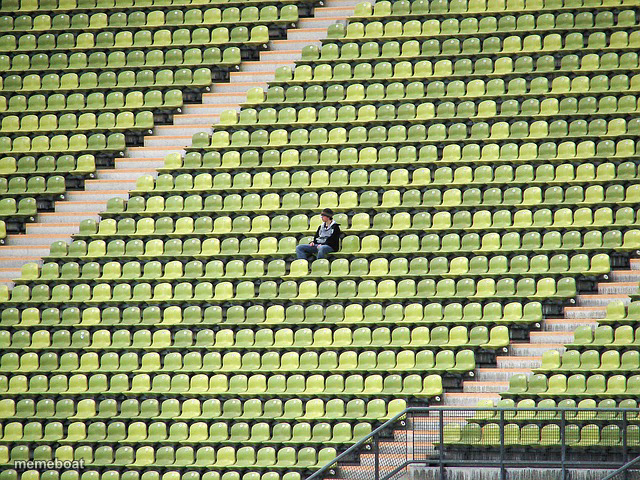
A single fan sits alone in a vast, empty stadium of green seats. The go-to image for loneliness, low turnout, or being the only one who showed up — caption and download free.
Blank Lonely fan meme template
Download the blank Lonely fan template to caption it yourself, or add your text right here in the editor above and download the finished meme.
When to use the Lonely fan meme
- Being the only person who shows up to an event
- Low turnout for a meeting, game, or party
- Feeling alone even when technically 'out in public'
Lonely fan template facts
- Dimensions
- 640 × 480 px
- Format
- JPG
- Text boxes
- 1
- Added
- 2025
About the Lonely fan meme template
One tiny person, thousands of empty seats. It's the visual definition of showing up when nobody else did — whether that's a meeting, a game, or your own birthday party.
Use it for low attendance jokes, being the only one who cares, or just flexing how alone you feel in a crowd that isn't there.
Popular Lonely fan caption ideas
THAT ONE XNTX WITH THAT INTEREST · THAT NOBODY HAS EVER COMPREHENDED AS AN OPTION TO BE INTERESTED IN
Me at my own going-away party since everyone left early
Attendance for the mandatory 8am training
When you're early and nobody else is coming
Templates similar to Lonely fan

Lonely fan meme FAQ
How do I make a Lonely fan meme?
Scroll up to the Lonely fan template, type your caption into the text box in the editor above, adjust the font, size and color if you like, then click download. Your finished Lonely fan meme is ready to share in seconds.
Can I use the Lonely fan template for free?
Yes. The Lonely fan template is completely free to use — no signup and no limits on how many memes you create or where you share them.
How do I download my Lonely fan meme?
Click the download button under the editor once your Lonely fan meme looks right. It saves straight to your device as a high-quality PNG or JPEG image.
How do I download the blank Lonely fan template?
Use the "Download blank template" button in the blank Lonely fan template section above to save the original, un-captioned image — handy if you'd rather caption it in another app or keep a copy.