
Lil_kitten11 bingo Meme Generator
Create Your Lil_kitten11 bingo Meme
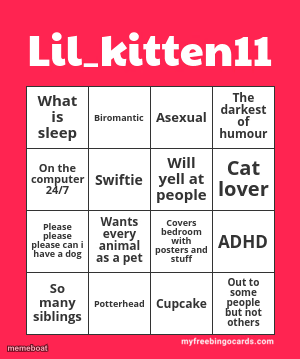
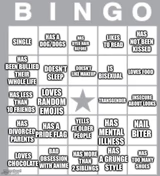
A pink bingo card template packed with personality-trait squares like Asexual, Swiftie, and ADHD — perfect for the "which ones apply to you" trend. Free to edit.
Blank Lil_kitten11 bingo meme template
Download the blank Lil_kitten11 bingo template to caption it yourself, or add your text right here in the editor above and download the finished meme.
When to use the Lil_kitten11 bingo meme
- Making your own "circle what applies to you" identity card
- Group chat personality tests that get a little too accurate
- Roasting a friend by filling out their bingo card for them
- Onboarding new followers with a fun about-me post
Lil_kitten11 bingo template facts
- Dimensions
- 300 × 359 px
- Format
- PNG
- Added
- 2025
About the Lil_kitten11 bingo meme template
This is one of those bingo-card personality templates that took over social media — a grid of random traits, fandoms, and quirks where you circle whichever ones describe you. This particular version leans internet-native: biromantic, asexual, ADHD, Swiftie, cat lover, all crammed into one loud pink card.
Templates similar to Lil_kitten11 bingo



Lil_kitten11 bingo meme FAQ
How do I make a Lil_kitten11 bingo meme?
Scroll up to the Lil_kitten11 bingo template, add your own text boxes in the editor above and type your captions, adjust the font, size and color if you like, then click download. Your finished Lil_kitten11 bingo meme is ready to share in seconds.
Can I use the Lil_kitten11 bingo template for free?
Yes. The Lil_kitten11 bingo template is completely free to use — no signup and no limits on how many memes you create or where you share them.
How do I download my Lil_kitten11 bingo meme?
Click the download button under the editor once your Lil_kitten11 bingo meme looks right. It saves straight to your device as a high-quality PNG or JPEG image.
How do I download the blank Lil_kitten11 bingo template?
Use the "Download blank template" button in the blank Lil_kitten11 bingo template section above to save the original, un-captioned image — handy if you'd rather caption it in another app or keep a copy.