
Elsa Let It Go Meme Generator
Create Your Elsa Let It Go Meme
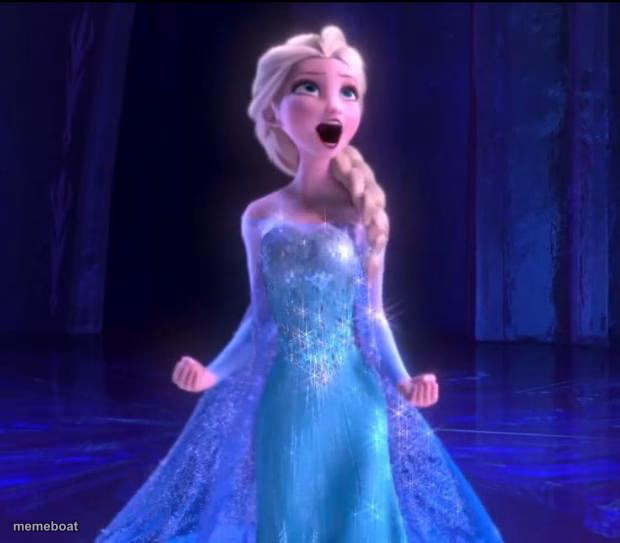
Elsa mid-belt, arms out, singing her heart out in the ice palace — the go-to template for dramatic declarations and 'I'm done caring' moments. Free captions.
Blank Elsa Let It Go meme template
Download the blank Elsa Let It Go template to caption it yourself, or add your text right here in the editor above and download the finished meme.
When to use the Elsa Let It Go meme
- Finally quitting the job that's been draining you
- Announcing you're done dieting/decided to eat the cake
- The moment you stop caring what people think
- Belting the chorus in the car like nobody's watching
Elsa Let It Go template facts
- Featuring
- Elsa (Frozen)
- Dimensions
- 620 × 543 px
- Format
- JPG
- Text boxes
- 1
- Added
- 2025
About the Elsa Let It Go meme template
Elsa, mouth wide open, fully committed to the big note, arms out like she's about to change her whole life in the next four bars. This is the template for anyone finally saying the thing they've been holding in — dramatically, loudly, and without apology.
Popular Elsa Let It Go caption ideas
me when i see that there's a hurricane named Elsa: · LET THE STORM RAGE ON!
Me after finally muting the group chat
Templates similar to Elsa Let It Go
Elsa Let It Go meme FAQ
How do I make a Elsa Let It Go meme?
Scroll up to the Elsa Let It Go template, type your caption into the text box in the editor above, adjust the font, size and color if you like, then click download. Your finished Elsa Let It Go meme is ready to share in seconds.
Can I use the Elsa Let It Go template for free?
Yes. The Elsa Let It Go template is completely free to use — no signup and no limits on how many memes you create or where you share them.
How do I download my Elsa Let It Go meme?
Click the download button under the editor once your Elsa Let It Go meme looks right. It saves straight to your device as a high-quality PNG or JPEG image.
How do I download the blank Elsa Let It Go template?
Use the "Download blank template" button in the blank Elsa Let It Go template section above to save the original, un-captioned image — handy if you'd rather caption it in another app or keep a copy.