
Laughs in Tallness Meme Generator
Create Your Laughs in Tallness Meme
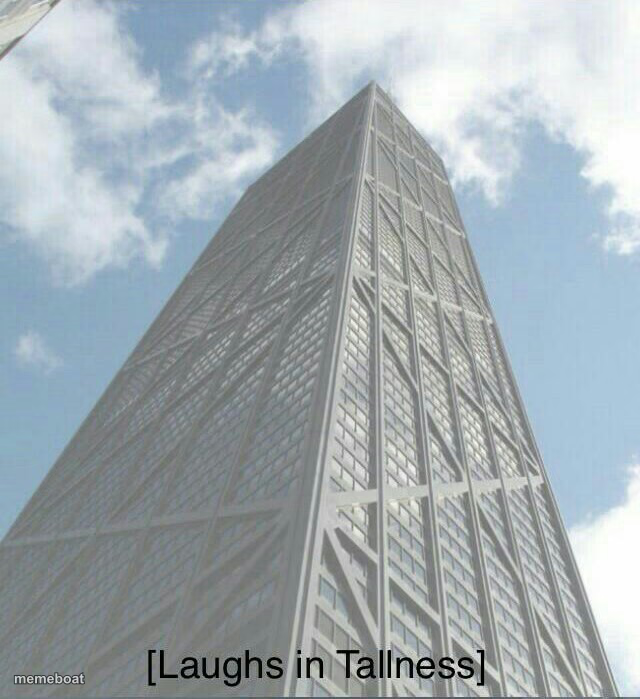
A skyscraper towering into the clouds, captioned 'Laughs in Tallness.' Perfect for flexing height, size, or dominance in any comparison. Free to caption and share.
Blank Laughs in Tallness meme template
Download the blank Laughs in Tallness template to caption it yourself, or add your text right here in the editor above and download the finished meme.
When to use the Laughs in Tallness meme
- Flexing your height over a shorter friend or sibling
- Comparing anything where bigger obviously wins
- Reacting smugly to someone trying to compete on size
- Basketball players towering over the rest of the team photo
Laughs in Tallness template facts
- Dimensions
- 640 × 699 px
- Format
- JPG
- Text boxes
- 1
- Added
- 2025
About the Laughs in Tallness meme template
Looking straight up at a skyscraper that just keeps going and going into the clouds — this is what pure, unbothered superiority looks like when the thing in question is simply bigger than everything around it.
Popular Laughs in Tallness caption ideas
Laughs in Tallness
Me at 6'5 in a crowded elevator
When someone says their WiFi router reaches the whole house
Templates similar to Laughs in Tallness






Laughs in Tallness meme FAQ
How do I make a Laughs in Tallness meme?
Scroll up to the Laughs in Tallness template, type your caption into the text box in the editor above, adjust the font, size and color if you like, then click download. Your finished Laughs in Tallness meme is ready to share in seconds.
Can I use the Laughs in Tallness template for free?
Yes. The Laughs in Tallness template is completely free to use — no signup and no limits on how many memes you create or where you share them.
How do I download my Laughs in Tallness meme?
Click the download button under the editor once your Laughs in Tallness meme looks right. It saves straight to your device as a high-quality PNG or JPEG image.
How do I download the blank Laughs in Tallness template?
Use the "Download blank template" button in the blank Laughs in Tallness template section above to save the original, un-captioned image — handy if you'd rather caption it in another app or keep a copy.