
Cool Guy Smiley Meme Generator
Create Your Cool Guy Smiley Meme
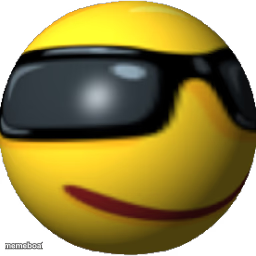
A glossy yellow 3D smiley wearing sunglasses with a smug smirk. Perfect for cool, confident, or 'nailed it' reactions — caption and download free.
Blank Cool Guy Smiley meme template
Download the blank Cool Guy Smiley template to caption it yourself, or add your text right here in the editor above and download the finished meme.
When to use the Cool Guy Smiley meme
- Reacting to something going surprisingly well for once
- Playing it cool after a mistake nobody noticed
- Captioning any 'no big deal, I've got this' moment
Cool Guy Smiley template facts
- Dimensions
- 256 × 256 px
- Format
- PNG
- Text boxes
- 1
- Added
- 2025
About the Cool Guy Smiley meme template
This chunky 3D smiley has one setting: effortlessly cool. Sunglasses on, smirk locked in, not a single worry in the world. It's the emoji equivalent of walking away from an explosion without looking back.
Popular Cool Guy Smiley caption ideas
submitted the report 2 minutes before deadline like it was nothing
me pretending I didn't just fall up the stairs
when the WiFi comes back right as you're about to rage quit
Templates similar to Cool Guy Smiley





Cool Guy Smiley meme FAQ
How do I make a Cool Guy Smiley meme?
Scroll up to the Cool Guy Smiley template, type your caption into the text box in the editor above, adjust the font, size and color if you like, then click download. Your finished Cool Guy Smiley meme is ready to share in seconds.
Can I use the Cool Guy Smiley template for free?
Yes. The Cool Guy Smiley template is completely free to use — no signup and no limits on how many memes you create or where you share them.
How do I download my Cool Guy Smiley meme?
Click the download button under the editor once your Cool Guy Smiley meme looks right. It saves straight to your device as a high-quality PNG or JPEG image.
How do I download the blank Cool Guy Smiley template?
Use the "Download blank template" button in the blank Cool Guy Smiley template section above to save the original, un-captioned image — handy if you'd rather caption it in another app or keep a copy.