
kai Meme Generator
Create Your kai Meme
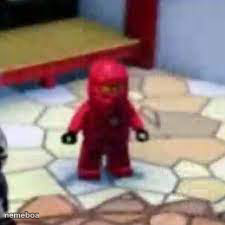
Kai the red ninja from LEGO Ninjago standing alone in a room, ready for any small-but-mighty caption. Caption and download free on Memeboat.
Blank kai meme template
Download the blank kai template to caption it yourself, or add your text right here in the editor above and download the finished meme.
When to use the kai meme
- Showing up to a casual hangout way overdressed
- Standing your ground over something completely minor
- The one friend who takes group projects way too seriously
- Walking into the kitchen like it's a boss battle
kai template facts
- Featuring
- Kai (LEGO Ninjago)
- Dimensions
- 225 × 225 px
- Format
- JPG
- Text boxes
- 2
- Added
- 2025
About the kai meme template
Kai standing there in full red ninja gear like he's about to say something dramatic, except the room is just a normal living room with a rug. Big main-character energy in a very low-stakes setting.
Use it whenever someone shows up way too prepared for a low-stakes situation, or for that one friend who treats every group chat drama like a martial arts standoff.
Popular kai caption ideas
ME WAITING FOR A REPLY FROM BRO · AFTER I ASK HOW OLD IS HIS GIRLFRIEND
me showing up to a casual game night · in full tryhard mode
group project partner who made a Gantt chart · for a 2-slide presentation


kai meme FAQ
How do I make a kai meme?
Scroll up to the kai template, type your caption into the 2 text boxes in the editor above, adjust the font, size and color if you like, then click download. Your finished kai meme is ready to share in seconds.
Can I use the kai template for free?
Yes. The kai template is completely free to use — no signup and no limits on how many memes you create or where you share them.
How do I download my kai meme?
Click the download button under the editor once your kai meme looks right. It saves straight to your device as a high-quality PNG or JPEG image.
How do I download the blank kai template?
Use the "Download blank template" button in the blank kai template section above to save the original, un-captioned image — handy if you'd rather caption it in another app or keep a copy.