
Chick Hicks Cars Meme Generator
Create Your Chick Hicks Cars Meme
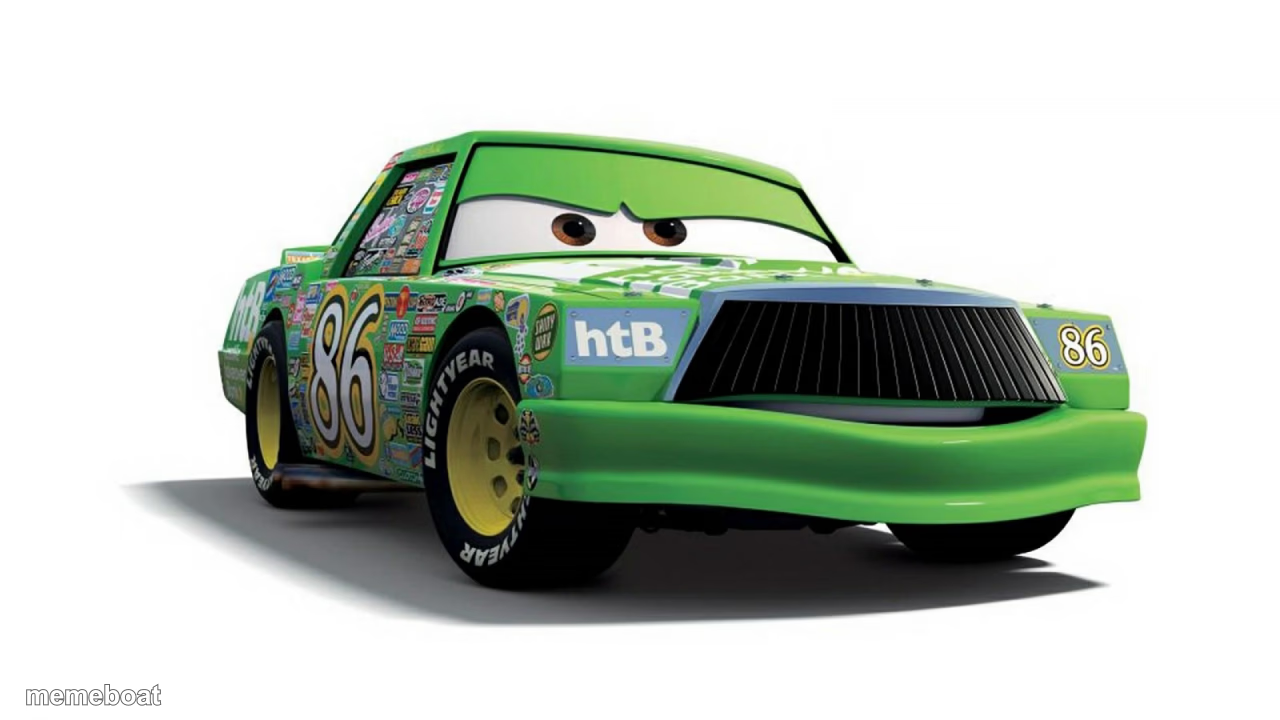
Chick Hicks, the green rival racecar from Pixar's Cars, giving side-eye. Perfect for smug, villainous, or 'I'm the real winner' jokes. Caption it free.
Blank Chick Hicks Cars meme template
Download the blank Chick Hicks Cars template to caption it yourself, or add your text right here in the editor above and download the finished meme.
When to use the Chick Hicks Cars meme
- Reacting smugly after winning something unfairly
- The office rival who takes credit for your work
- Anyone who thinks they're the main character but isn't
Chick Hicks Cars template facts
- Featuring
- Chick Hicks (Cars (Pixar))
- Dimensions
- 1280 × 720 px
- Format
- JPG
- Text boxes
- 2
- Added
- 2025
About the Chick Hicks Cars meme template
Chick Hicks, the perpetually smug #86 stock car who never got the respect he thought he deserved, giving that signature side-eye look. He's less iconic than Lightning McQueen but exactly what you need for the smug-underdog-who's-secretly-the-villain energy.
Popular Chick Hicks Cars caption ideas
Me after taking credit for your idea · in the meeting
When you cut in line · and nobody says anything
Second place · acting like first
Templates similar to Chick Hicks Cars


Chick Hicks Cars meme FAQ
How do I make a Chick Hicks Cars meme?
Scroll up to the Chick Hicks Cars template, type your caption into the 2 text boxes in the editor above, adjust the font, size and color if you like, then click download. Your finished Chick Hicks Cars meme is ready to share in seconds.
Can I use the Chick Hicks Cars template for free?
Yes. The Chick Hicks Cars template is completely free to use — no signup and no limits on how many memes you create or where you share them.
How do I download my Chick Hicks Cars meme?
Click the download button under the editor once your Chick Hicks Cars meme looks right. It saves straight to your device as a high-quality PNG or JPEG image.
How do I download the blank Chick Hicks Cars template?
Use the "Download blank template" button in the blank Chick Hicks Cars template section above to save the original, un-captioned image — handy if you'd rather caption it in another app or keep a copy.