
Joker Hospital Scene Meme Generator
Create Your Joker Hospital Scene Meme
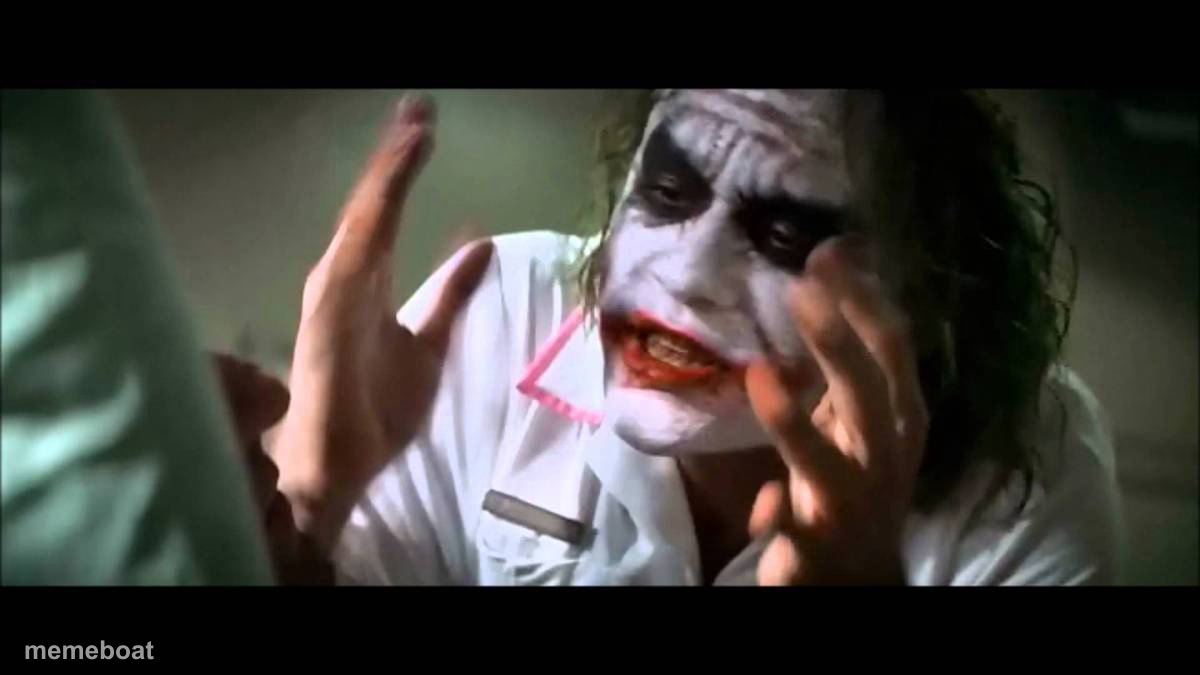
Heath Ledger's Joker in his nurse outfit, hands up and grinning after the hospital blows up. The go-to reaction for chaos and 'let it burn' moments — caption free.
Blank Joker Hospital Scene meme template
Download the blank Joker Hospital Scene template to caption it yourself, or add your text right here in the editor above and download the finished meme.
When to use the Joker Hospital Scene meme
- Walking away from a disaster you 100% caused
- Deleting the group chat after starting drama
- Watching your code deploy straight to production on a Friday
- Reacting to your own chaotic plan finally working
Joker Hospital Scene template facts
- Featuring
- The Joker (The Dark Knight)
- Dimensions
- 1200 × 675 px
- Format
- JPG
- Added
- 2025
About the Joker Hospital Scene meme template
The Joker, dressed as a nurse, hands raised, watching the hospital he just blew up burn behind him — and somehow he looks delighted about it. This is the definitive face of 'everything is on fire and I regret nothing.'
Popular Joker Hospital Scene caption ideas
EXPLAINING TO NURSES · HOW TO DO THEIR JOB
Templates similar to Joker Hospital Scene

Joker Hospital Scene meme FAQ
How do I make a Joker Hospital Scene meme?
Scroll up to the Joker Hospital Scene template, add your own text boxes in the editor above and type your captions, adjust the font, size and color if you like, then click download. Your finished Joker Hospital Scene meme is ready to share in seconds.
Can I use the Joker Hospital Scene template for free?
Yes. The Joker Hospital Scene template is completely free to use — no signup and no limits on how many memes you create or where you share them.
How do I download my Joker Hospital Scene meme?
Click the download button under the editor once your Joker Hospital Scene meme looks right. It saves straight to your device as a high-quality PNG or JPEG image.
How do I download the blank Joker Hospital Scene template?
Use the "Download blank template" button in the blank Joker Hospital Scene template section above to save the original, un-captioned image — handy if you'd rather caption it in another app or keep a copy.