
Joe Biden Smiling Meme Generator
Create Your Joe Biden Smiling Meme
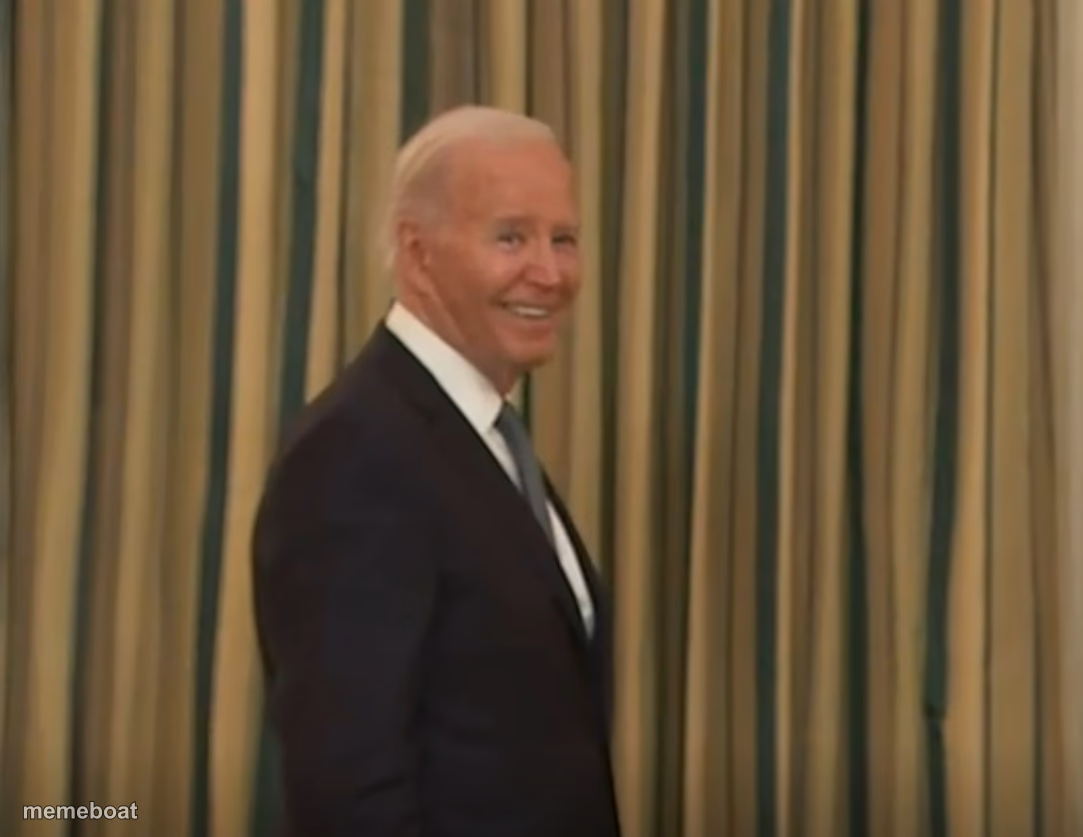
President Joe Biden smiling in profile against striped curtains — perfect for political jokes and reaction memes. Caption free at Memebo.
Blank Joe Biden Smiling meme template
Download the blank Joe Biden Smiling template to caption it yourself, or add your text right here in the editor above and download the finished meme.
When to use the Joe Biden Smiling meme
- Reacting smugly to good news nobody else is happy about
- Political satire captions about policy wins or gaffes
- Walking away from a disaster like nothing happened
- "Me pretending everything is fine" energy
Joe Biden Smiling template facts
- Featuring
- Joe Biden (White House event)
- Dimensions
- 1083 × 837 px
- Format
- PNG
- Added
- 2025
About the Joe Biden Smiling meme template
A candid side profile of Joe Biden mid-smile, walking past some very presidential striped curtains. Calm, pleasant, a little smug — the kind of expression that works for almost any punchline you throw at it.
Popular Joe Biden Smiling caption ideas
THAT LOOK YOU GIVE · WHEN THEY ASK WHO'S BEEN RUNNING THE COUNTRY THIS WHOLE TIME.
Templates similar to Joe Biden Smiling

Joe Biden Smiling meme FAQ
How do I make a Joe Biden Smiling meme?
Scroll up to the Joe Biden Smiling template, add your own text boxes in the editor above and type your captions, adjust the font, size and color if you like, then click download. Your finished Joe Biden Smiling meme is ready to share in seconds.
Can I use the Joe Biden Smiling template for free?
Yes. The Joe Biden Smiling template is completely free to use — no signup and no limits on how many memes you create or where you share them.
How do I download my Joe Biden Smiling meme?
Click the download button under the editor once your Joe Biden Smiling meme looks right. It saves straight to your device as a high-quality PNG or JPEG image.
How do I download the blank Joe Biden Smiling template?
Use the "Download blank template" button in the blank Joe Biden Smiling template section above to save the original, un-captioned image — handy if you'd rather caption it in another app or keep a copy.