
Jill Biden Meme Generator
Create Your Jill Biden Meme
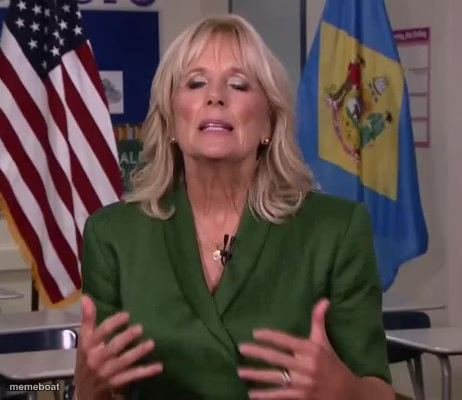
Jill Biden mid-sentence, hands raised, speaking in front of American and state flags. Use it for earnest-explainer or political-speech style jokes. Free to caption.
Blank Jill Biden meme template
Download the blank Jill Biden template to caption it yourself, or add your text right here in the editor above and download the finished meme.
When to use the Jill Biden meme
- Mocking overly earnest public service announcements
- Any "here's a very important message" political parody
- Captioning well-meaning but out-of-touch advice
- Explaining something with way more hand gestures than necessary
Jill Biden template facts
- Featuring
- Jill Biden (U.S. politics)
- Dimensions
- 462 × 400 px
- Format
- JPG
- Text boxes
- 1
- Added
- 2025
About the Jill Biden meme template
Jill Biden caught mid-gesture in a classroom-style setting, flags behind her, looking like she's about to explain something very seriously and very sincerely. That earnest "let me tell you something important" energy is prime meme material.
Popular Jill Biden caption ideas
and that's why you should eat your vegetables
"kids, homework is actually really fun"
me explaining to my boss why I was 20 minutes late
Templates similar to Jill Biden
Jill Biden meme FAQ
How do I make a Jill Biden meme?
Scroll up to the Jill Biden template, type your caption into the text box in the editor above, adjust the font, size and color if you like, then click download. Your finished Jill Biden meme is ready to share in seconds.
Can I use the Jill Biden template for free?
Yes. The Jill Biden template is completely free to use — no signup and no limits on how many memes you create or where you share them.
How do I download my Jill Biden meme?
Click the download button under the editor once your Jill Biden meme looks right. It saves straight to your device as a high-quality PNG or JPEG image.
How do I download the blank Jill Biden template?
Use the "Download blank template" button in the blank Jill Biden template section above to save the original, un-captioned image — handy if you'd rather caption it in another app or keep a copy.